In October 2013, a United States senator sat in a congressional hearing with an iPad, trying to prove a point on live television. He opened healthcare.gov — the site tens of millions of Americans were supposed to use to get health insurance — and tapped the button that said Create Account.
Nothing happened.
He tapped it again. Still nothing. The most expensive government website in history, the centerpiece of a president’s signature law, sat frozen on a screen in front of the entire country. It was, in the most literal sense, a broken button. And it became one of the most public software failures ever.
One of the engineers pulled into the emergency “tech surge” to fix that site was a man named Jason Huggins. If you’ve written a browser test at any point in the last twenty years, you already owe him something — because a decade earlier, Jason had created Selenium, the tool that taught the world how to automate a web browser. Now he’s built something new, aimed squarely at the AI era, and he’s calling it Vibium.
This is the story of what Vibium is, why the person who defined browser automation decided it was time to reinvent it, and how the thing actually works under the hood.
The technical details below come from Vibium’s official docs and GitHub repo; the vision and backstory come from Jason Huggins’s own talks and interviews. Where something is a future ambition rather than a shipping feature, I say so plainly.
Vibium in one paragraph
Vibium is a free, open-source (Apache-2.0) browser automation tool created by Jason Huggins, the creator of Selenium — and it’s designed for AI agents as much as for humans. Instead of CSS selectors, it exposes a small set of semantic commands (go, map, find, click, text) and short @eN element references that a language model can use reliably. It ships as a single ~10 MB Go binary that manages its own Chrome, speaks the W3C WebDriver BiDi standard, and works three ways: as a CLI, as an MCP server for coding agents, and through JavaScript, Python, and Java client libraries. That’s what exists today; the larger vision — AI that maps your app and generates tests from real usage — is the roadmap. The rest of this article unpacks both.
First, the man
The Selenium story is one of those quiet origin myths that most engineers half-know. In the early 2000s, Jason was working at ThoughtWorks, and the web was getting complicated fast — dynamic pages, JavaScript, interactive forms — while testing was still mostly a human clicking through the same workflow over and over, hoping not to miss anything. He got tired of it and built a small internal tool to make the browser click through the steps for him.
He named it Selenium as a joke. A rival commercial testing tool at the time was called Mercury — and selenium, the mineral, is famously sold as a supplement to counteract mercury poisoning. The name stuck. The tool leaked out of ThoughtWorks, the open-source community picked it up, and over the next two decades Selenium didn’t just get popular — it became the industry standard. It launched careers, spawned an entire test-automation services industry, and quietly ended up inside almost every QA stack on earth. Jason went on to co-found Sauce Labs and co-create Appium for mobile testing. Then came the healthcare.gov rescue, where he watched a broken button take down a national program on live TV.
So when Jason Huggins says he’s building the successor to Selenium, it’s worth paying attention. He’s not a startup founder who read about testing last quarter. He’s the person the story started with.
Why come back now?
Here’s the honest tension at the heart of Vibium: Jason doesn’t actually think Selenium is dead. When people ask him if it’s obsolete, his answer is blunt —
“Selenium is not obsolete because I’m literally depending on it as the base layer for the stuff that I’m working on.”
His real complaint is that Selenium has a perception problem, not a technology problem. It’s twenty years old, it doesn’t have a marketing war chest, and “old” gets used as a lazy synonym for “replace it.” Meanwhile the genuinely good ideas that showed up in Playwright and Puppeteer — including the modern WebDriver BiDi protocol that Vibium is built on — are in many ways lessons harvested from Selenium’s own long history.
What actually changed isn’t the browser. It’s who’s driving it. The people (and increasingly, the agents) writing automation today are frequently not the kind of engineers who can hand-craft a resilient CSS selector. And the single most hated problem in all of QA never got solved: flaky tests. Surveys still put flakiness at the top of the list of things that make testers miserable — tests that fail not because the app is broken, but because a class name moved or a cookie banner popped up. Jason’s bet is that AI, applied carefully, can finally attack that problem at the root. In his words:
“With Selenium, we proved automation could be open and powerful. With Vibium, I want to prove it can also be intelligent, adaptive, and accessible to everyone.”
The philosophy: a self-driving car that still has a steering wheel
The metaphor Jason keeps returning to is worth internalizing, because it explains why Vibium is designed the way it is. He doesn’t want an autopilot that seizes total control and locks the human out. He wants a self-driving car that still has a steering wheel — a system that does the tedious, error-prone work for you but never removes your ability to grab the wheel.
That shapes everything. At the low level, you can still write ordinary tests in a real programming language if you want to. At the high level, the platform aspires to do the heavy lifting: build the tests, run them, triage the failures, and grow your coverage from how the app is actually used. It’s meant for the pragmatic middle — the AI-assisted engineer who lets the machine do most of the work but keeps reviewing and shaping what it produces.
What ships today: the browser, handed to an agent
Before the grand vision, there’s a real, downloadable, Apache-licensed tool you can run right now. And it’s deliberately small.
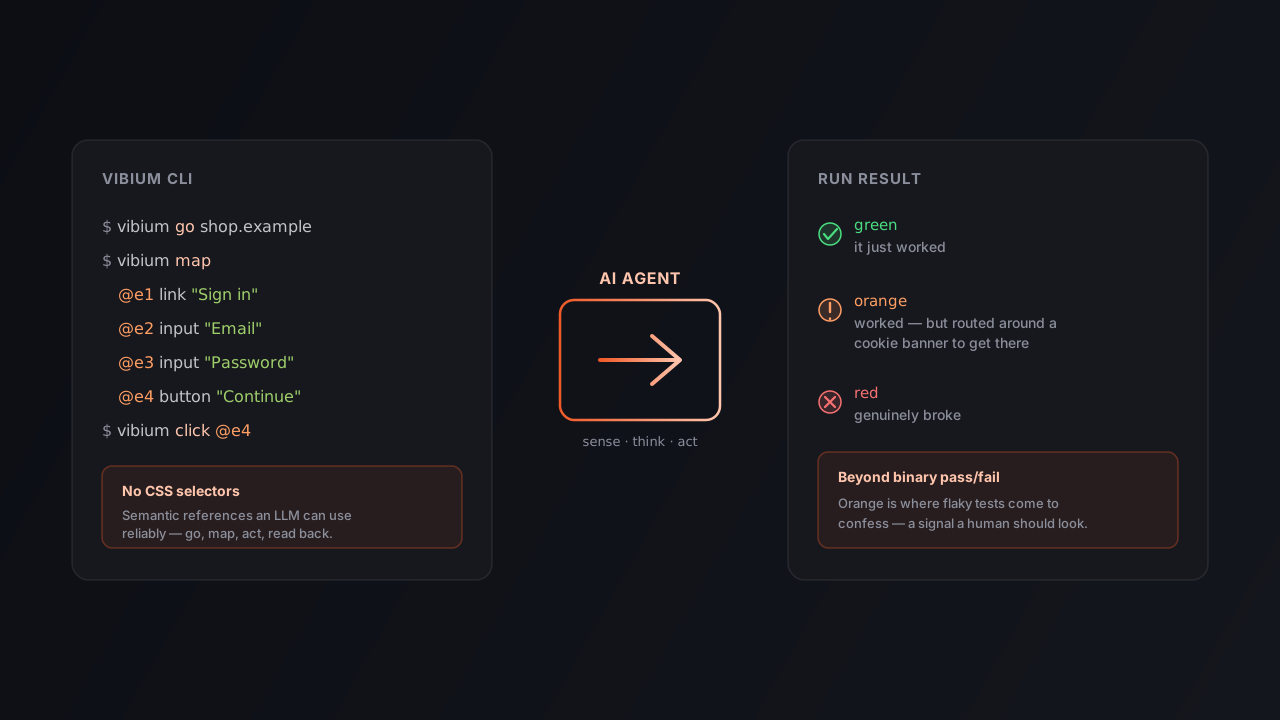
Vibium gives an agent — or you, at a shell — a live browser and a compact set of verb-shaped commands. The whole working rhythm is four beats: open a page, map what’s on it, act on something, read back the result.
vibium go https://example.com   # open a page
vibium map                      # list interactive elements → @e1, @e2, @e3 ...
vibium click @e1                # act on one of them
vibium text                     # read the page back
The clever part is the middle. Instead of demanding a CSS selector for every click, Vibium numbers the interactive elements on the page and lets you point at them by short, stable IDs:
@e1  link    "Sign in"
@e2  input   placeholder="Email"
@e3  input   placeholder="Password"
@e4  button  "Continue"
Why does this matter so much? Because a selector like #app > form.auth input[type=email] is exactly the kind of thing that (a) breaks the moment a designer renames a class, and (b) a language model can’t reliably produce from a page it can only half-see. An @e2 reference and a plain-English description of what’s on the page are things a model handles beautifully.
That same instinct drives how you find things. Vibium’s find command matches elements the way a human would describe them, not the way a stylesheet addresses them:
vibium find text "Sign in"           # by visible text
vibium find label "Email"            # by the field's label
vibium find placeholder "Search..."  # by placeholder
vibium find role button              # by ARIA role
CSS selectors aren’t the front door here — though they’re still reachable through vibium eval, which runs arbitrary JavaScript for the rare case the semantic commands can’t express. The documented guidance sums up the whole attitude: reach for the semantic commands first; reach for eval only when they’re not enough.
A few more things worth knowing about the tool as it exists today:
- It keeps the browser alive between commands. A background daemon owns the browser, so each command is fast and state carries over — cookies, the current page, scroll position, your element references. That’s why
vibium textneeds no URL: it just reads whatever page you last opened. - It’s built on a standard, not a private protocol. Under the hood it speaks W3C WebDriver BiDi, the same standards-track protocol the whole ecosystem is drifting toward — a deliberate bet on open standards over any one vendor’s debugging API.
diff maptells you what changed. After an action, instead of re-reading the whole page, you can ask “what’s different since my last map?” and get a compact answer — a modal appeared, a button vanished. Genuinely useful for an agent deciding what to do next.- It captures cleanly.
text,screenshot,pdf, andrecordnever change the page;go,click,fill,select,check, andpressalways might. That clean split makes side effects easy to reason about. - One tool, three doorways. Use it as a CLI (or zero-install via
npx -y vibium ...), register it as an MCP server so agents like Claude Code, Codex, Cursor, or Cline get browser tools natively, or drive it from client libraries in JavaScript, Python, and Java. All three share the same binary and the same browser.
You can even try the whole thing without installing anything, which is a small but telling detail — it’s built to be picked up by a script or an agent on a machine it’s never seen before:
npx -y vibium go https://example.com
npx -y vibium screenshot -o page.png
npx -y vibium text
That’s the shipping V1. It’s real, it’s lightweight (a single ~10 MB binary that downloads its own Chrome), and it’s honestly quite pleasant. But it’s also just the foundation. The interesting part is what Jason wants to build on top of it.
The robotics vision: Sense, Think, Act
Jason is a robotics guy at heart — he’s built ball-balancing and drawing robots for fun — and he’s structured Vibium the way you’d structure a robot. A robot senses its environment, thinks about what to do, and acts. Vibium mirrors that with three named components:
- Retina — Sense. The eyes. It captures what the browser sees: DOM snapshots, screenshots, the raw perceptual state of the page.
- Cortex — Think. The brain and memory. It builds and holds a map of your application — how the pages connect, what the workflows are.
- Clicker — Act. The hands. This is the browser-automation engine that actually navigates, clicks, and types. It’s the part that ships today (you’ll even find a
clicker/directory in the repo); the map→act→read CLI you just read about is Clicker.
Retina and Cortex are on the published roadmap rather than fully shipped — but you can see why the architecture is drawn this way. Automation that can only act is a puppet. Automation that can sense and think is something closer to an autonomous tester.
The big idea: stop writing tests, start mapping the app
This is the part that would make a veteran QA engineer sit up, and it’s where Vibium stops being “a nicer Selenium” and becomes a genuinely different proposition.
Jason’s core insight is that most test automation is guesswork bolted onto a moving target. You write a script that assumes the app works a certain way, and then you spend the rest of your life patching it as the app shifts underneath you. His alternative is model-based testing, an old idea made suddenly practical by LLMs:
- Instrument the app so that meaningful user actions emit events — a page was visited, a button was clicked, a form was submitted, a 3D model was rotated.
- Aggregate those events — from real user telemetry or from a developer clicking around — into a graph: a map of every page, state, and path through your application.
- Feed that map to an LLM, which can now reason about real workflows (“can a user actually buy a product?”) and generate end-to-end tests from the paths people genuinely take.
- Run those tests intelligently, and when a code change lands, only re-run the slice of the map that change could plausibly affect.
The line Jason uses to describe the payoff is the one to remember:
“By recording all these events, you’re effectively creating a model of your application. Once you have a model, you get automated tests for free.”
He built a demo site, testtrack.org, partly around a 3D chess board rendered in three.js — precisely because a WebGL canvas is a nightmare for classic DOM-based testing. His point: it doesn’t matter whether the UI is a boring login form or a 3D chessboard. As long as the app emits semantic events about what the user did, Vibium can map the flow and reason about it. He even imagines the interface as a kind of Google Maps for your application — a zoomable map of every workflow, overlaid with which paths real users take and which ones actually have test coverage, next to a live “cam” of the automated agents clicking through your site.
Killing the binary pass/fail: green, orange, red
One more idea from Jason that lands hard with anyone who’s lived in a CI dashboard. Tests today are binary: green or red, pass or fail. But real automated runs live in a messy middle — the test passed, but only because it dismissed an unexpected cookie banner, or clicked an alternate button after a designer changed a label, or retried through a flaky network blip.
Vibium’s answer is a third color: orange. Green means it just worked. Red means it genuinely broke. Orange means it worked, but the system had to route around something unexpected to get there. Orange is where flakiness comes to confess. Instead of the false confidence of a green check or the panic of a red X, you get a nuanced signal that says “a human might want to look at this.” For a discipline that’s spent two decades pretending tests are either fine or broken, that’s a small revolution.
So what happens to QA jobs?
Jason’s answer to the inevitable question is a careful “no, but they’ll change.” He doesn’t see Vibium erasing testers; he sees the work moving up the stack. Less clicking through the same regression flow by hand, more supervising fleets of automated agents — defining what “correct” means, interpreting all those orange results, tuning the models and the instrumentation, and designing the gnarly edge cases the agents can’t figure out on their own. Testers become conductors rather than players. New roles come with it: people who make apps testable by emitting the right telemetry, people who maintain the app maps, people who clean up after vibe-coded messes.
It’s a notably humane vision for an AI tool — the whole point, he says, is to preserve the hard-won expertise of people who know how to test, and give them somewhere valuable to stand in the AI era rather than automating them out of existence.
An honest read on where it stands
For all the ambition, it’s worth being clear-eyed. What you can download and run today is the Clicker layer: a clean, small, Chrome-only browser-automation tool with a lovely agent-friendly design. The sensing (Retina), the memory and app-mapping (Cortex), the LLM-generated tests, the green/orange/red dashboard, the zoomable maps — those range from “on the roadmap” to “described in talks.” The mature frameworks still win on breadth, browser coverage, and battle-testing.
But that’s arguably the right way to read it. Selenium didn’t start as an industry standard either; it started as one engineer’s fix for his own annoyance and grew because the ideas were right. Vibium is the same person making a second, much bigger bet — this time that the future of testing isn’t better scripts, but a living map of how software is actually used, with AI turning that map into tests and humans keeping a hand on the wheel.
Whether or not the whole vision lands, the foundation is real, it’s open source, and it’s shaped by someone who has already been right about this once.
Frequently asked questions
What is Vibium? A free, open-source (Apache-2.0) browser automation tool created by Jason Huggins, designed for AI agents as much as humans: semantic commands and @eN element references instead of CSS selectors, a single Go binary, WebDriver BiDi underneath, usable as a CLI, MCP server, or client library.
Who created Vibium? Jason Huggins — the creator of Selenium and co-creator of Appium, and part of the emergency team that rescued healthcare.gov in 2013.
Is Selenium obsolete now? Not according to Jason. He says Vibium literally depends on the same browser-automation foundations, and that Selenium’s problem is perception and marketing, not technology.
Is Vibium free and open source? Yes — Apache 2.0. The core engine is written in Go, with client libraries for JavaScript/TypeScript, Python, and Java.
What can I actually use today? The “Clicker” layer: the CLI, MCP server, and client libraries for driving a browser — navigate, map, find, fill, click, capture. The AI app-mapping and test-generation features are the larger roadmap.
Which browsers work? Chrome for now, via a managed Google Chrome for Testing build that downloads automatically. Broader support is expected to follow as more browsers ship WebDriver BiDi.
What makes it “AI-native”? Small verb-shaped commands, semantic locators, and short @eN references that LLMs can use reliably — plus a roadmap built around sensing the app, modeling it, and generating resilient tests from real usage.
Will it replace QA engineers? Jason’s view: no, but the role shifts from manual execution to supervising, triaging, and modeling — testers as conductors of automated agents.
The takeaway
Twenty years ago, Jason Huggins got annoyed enough at clicking the same buttons to teach computers to click them for him, and accidentally defined an industry. Then he watched a single broken button embarrass a nation on live TV. Vibium is what he built after all of that: a bet that the next era of testing belongs to AI agents that sense, think, and act on our behalf — driving the browser while we keep a hand on the wheel. Today it’s a tidy, standards-based automation tool. Tomorrow, if he’s right again, it’s a map of how all our software actually works.
Sources
- Vibium Documentation and full docs context
- VibiumDev/vibium on GitHub
- Revolutionizing Test Automation with Vibium AI: Jason Huggins — UltimateQA (Nikolay Advolodkin)
- The Man Behind the Inspiration: From Selenium to Vibium — PrimeQA Solutions
- Vibium: The AI-Native Successor to Selenium — TestGrid
- W3C WebDriver BiDi specification