Overview
OrbitTest lets you write browser tests using what users see — visible labels, roles, and text — rather than CSS selectors or XPath. It handles browser lifecycle, parallelism, retries, trace capture, structured failure reporting, and CI integration out of the box.
Feature Status
| Feature | Status |
|---|---|
UI automation | Stable |
Test lifecycle hooks | Stable |
Intent-based locator engine | Stable |
Text readers (text, visibleText, domText) | Stable |
Browser storage & session management | Stable |
Alerts, notifications, window/tab management | Stable |
Frames and Shadow DOM traversal | Stable |
HTML/JSON/JUnit reports | Stable |
CI/CD mode (sharding, fail-fast, annotations) | Stable |
Step trace & trace timeline | Stable |
Smart Report (browser evidence collection) | Stable |
UI local dashboard | Stable |
Forge test recorder | Stable |
Android mobile provider (@orbittest/mobile) | Phase 1 |
Visual automation (canvas, WebGL, pixel checks) | Experimental |
API testing | Planned |
Intent-First
Interact using visible text, labels, and roles — exactly what users see. No CSS selectors required for common flows.
Zero Config to Start
Run orbittest init and you're writing tests. No framework config needed for basic use.
Rich Reports
HTML, JSON, and JUnit output. Inline screenshots, trace timelines, and Smart browser evidence on failure.
CI-Ready
Sharding, retries, fail-fast, flaky detection, and GitHub Actions annotations built in.
Forge Recorder
Record interactions in a live browser and get a ready-to-run OrbitTest script instantly.
Mobile Testing
Android automation via @orbittest/mobile. ADB + UIAutomator, no Appium required.
Installation
Install as a project dependency:
npm install orbittest
Or install globally:
npm install -g orbittest
Requirements: Node.js 18 or later. A Chromium-based browser is required at runtime. OrbitTest will use system Chrome by default, or specify a path via ORBITTEST_CHROME_PATH.
Quick Start
Initialize a new project:
$ orbittest init
This creates:
orbittest.config.js tests/ example.test.js reports/
Write a test:
const { test, expect } = require('orbittest'); test('Login flow', async (orbit) => { await orbit.open('https://example.com'); await orbit.click('Login'); await orbit.type('Email', 'user@example.com'); await orbit.type('Password', 'secret'); expect(await orbit.hasText('Dashboard')).toBe(true); });
Run it:
$ orbittest run Passed: 1 Failed: 0 Report: reports/runs/<run-id>/report.html
No CSS selectors. No XPath. No framework configuration needed for basic use.
Configuration
OrbitTest reads orbittest.config.js from the project root. All fields are optional.
module.exports = { // Test discovery testDir: 'tests', testMatch: ['**/*.test.js', '**/*.spec.js'], // Parallelism workers: 1, maxWorkers: 4, // Retry policy retries: 0, // Timeouts (ms) testTimeout: 30000, actionTimeout: 0, // Browser display: "auto" | "show" | "hide" browser: { display: 'auto' }, // CI/CD mode ci: { enabled: Boolean(process.env.CI), retries: 1, trace: 'on-failure', screenshot: 'on-failure', failFast: false, shard: process.env.ORBITTEST_SHARD || null, githubAnnotations: Boolean(process.env.GITHUB_ACTIONS) }, // Smart Report smartReport: false, };
Writing Tests
Basic test
const { test, expect } = require('orbittest'); test('Home page loads', async (orbit) => { await orbit.open('https://example.com'); expect(await orbit.hasText('Example Domain')).toBe(true); });
Test options
test('Slow flow', { retries: 2, timeout: 60000 }, async (orbit) => { await orbit.open('https://example.com'); });
Lifecycle Hooks
const { beforeAll, afterAll, beforeEach, afterEach, test } = require('orbittest'); beforeAll(async (runInfo) => { console.log(`Run started: ${runInfo.runId}`); }); beforeEach(async (orbit, testInfo) => { console.log(`Starting: ${testInfo.name}`); }); afterEach(async (orbit, testInfo) => { if (testInfo.status === 'failed') { await orbit.screenshot(`reports/${testInfo.name}.png`); } });
testInfo fields: name, file, index, attempt, retry, retries, timeout, status, startedAt, endedAt, durationMs, error, artifacts.
Locators
OrbitTest is intent-first: most actions accept visible text and resolve the target automatically. Use explicit locators when text resolution is ambiguous.
| Locator | Usage |
|---|---|
Text string | await orbit.click("Login") |
CSS selector | await orbit.click(orbit.css("#login-btn")) |
XPath | await orbit.click(orbit.xpath("//button[text()='Login']")) |
Role | await orbit.click(orbit.getByRole("button", "Login")) |
Attribute | await orbit.click(orbit.getByAttribute("data-testid", "submit")) |
Object literal | await orbit.click({ css: "#login" }) |
Working with Elements
Text readers
| Helper | Returns | Hidden content |
|---|---|---|
orbit.text(locator) | DOM text, form values, ARIA label, title, alt | May include ARIA sources |
orbit.visibleText(locator) | Rendered visible text only | Excluded |
orbit.domText(locator) | Full DOM text from the element tree | Included |
Collections
const buttons = await orbit.all(orbit.css('button')); for (const button of buttons) { if (button.visible) { await orbit.click(button); } }
Frames & Shadow DOM
iFrames
const billing = await orbit.frame(orbit.getByAttribute('title', 'Billing')); await billing.type('Email', 'team@example.test'); await billing.click('Save billing'); expect(await billing.exists('Saved')).toBe(true);
Shadow DOM
const profile = await orbit.shadow(orbit.css('user-profile')); await profile.type('Email', 'team@example.test'); await profile.click('Save');
Browser Storage & Sessions
// Cookies await orbit.storage.setCookie({ name: 'session', value: 'abc123' }); const cookies = await orbit.storage.cookies(); await orbit.storage.clearCookies(); // localStorage await orbit.storage.setLocal('token', 'abc123'); const token = await orbit.storage.getLocal('token'); // Save/restore login state await orbit.storage.saveSession('auth/session.json'); await orbit.storage.loadSession('auth/session.json');
Alerts, Notifications & Windows
// Dialogs expect(await orbit.alertText()).toBe('hello'); await orbit.acceptAlert(); await orbit.dismissAlert(); // Notifications await orbit.grantNotifications(); // Windows / Tabs await orbit.click('Open report'); const popup = await orbit.waitForWindow({ switchTo: true }); await orbit.switchToWindow(0); await orbit.closeWindow(popup.id);
Browser Actions API
| Category | Method | Description |
|---|---|---|
| nav | orbit.open(url) | Navigate to a URL |
| interact | orbit.click(target) | Click an element by text/locator |
| interact | orbit.doubleClick(target) | Double-click |
| interact | orbit.rightClick(target) | Right-click |
| interact | orbit.hover(target) | Hover over element |
| interact | orbit.type(label, text) | Type into an input matched by label |
| read | orbit.hasText(text) | Assert text presence on page |
| read | orbit.title() | Get page title |
| read | orbit.url() | Get current URL |
| read | orbit.text(locator) | Read element text |
| read | orbit.visibleText(locator) | Read rendered visible text |
| read | orbit.exists(locator) | Check element existence |
| read | orbit.all(locator) | Get all matching elements |
| wait | orbit.waitForText(text) | Wait for text to appear on page |
| wait | orbit.waitFor(locator) | Wait for element to exist |
| wait | orbit.wait(ms) | Fixed delay (use sparingly) |
| advanced | orbit.evaluate(fn) | Execute JS in the browser context |
| advanced | orbit.screenshot(path) | Capture a screenshot |
| advanced | orbit.frame(locator) | Scope to an iframe |
| advanced | orbit.shadow(locator) | Scope to a shadow root |
| advanced | orbit.pageState() | Get { title, url, … } |
CLI Reference
| Command | Description |
|---|---|
orbittest run [files] | Run tests |
orbittest init | Initialize a new project |
orbittest ui | Open the local UI dashboard |
orbittest forge [url] | Open the Forge test recorder |
orbittest clean-reports | Remove old report runs |
orbittest devices | List connected Android devices |
orbittest doctor | Check environment and dependencies |
orbittest run flags
| Flag | Description |
|---|---|
--workers <n> | Number of parallel workers |
--retries <n> | Retry count per test |
--timeout <ms> | Test timeout in milliseconds |
--env <name> | Activate a named environment |
--ci | Enable CI mode |
--fail-fast | Stop after first failure |
--max-failures <n> | Stop after N failures |
--shard <n/total> | Run a shard, e.g. 1/4 |
--github-annotations | Emit GitHub Actions annotations on failure |
--trace | Capture step-by-step trace |
--smart-report | Capture browser evidence for failure diagnosis |
--step | Live debugging with Orbit Inspector |
--show-browser | Force visible browser |
--hide-browser | Force headless browser |
--verbose | Print internal browser/action logs |
Environment Variables
| Variable | Description |
|---|---|
ORBITTEST_CHROME_PATH | Path to a custom Chrome/Chromium executable |
ORBITTEST_SHARD | Shard assignment in <n>/<total> format |
CI | Standard CI flag — enables headless browser and CI mode defaults |
GITHUB_ACTIONS | Enables GitHub annotation output |
Reports & Diagnostics
Every run produces:
reports/ latest.html latest.json latest-summary.json latest-junit.xml runs/ <run-id>/ report.html report.json junit.xml artifacts/ screenshots/ traces/
Trace Mode
Captures a step-by-step timeline for every test. The HTML report includes status, duration, URL, title, and screenshot links per step.
$ orbittest run tests/login.test.js --trace
Smart Report
Collects console errors, JS exceptions, failed network requests, slow requests, and navigation events. Detects clear application failures even without explicit assertions.
$ orbittest run tests/login.test.js --smart-report
Step Mode (Live Debugging)
$ orbittest run tests/login.test.js --step
Pauses before each orbit.* action. Click actions display a red dot at the exact coordinate. Trace is written automatically.
CI/CD Integration
Sharding
$ orbittest run --ci --shard 1/4 $ orbittest run --ci --shard 2/4 $ orbittest run --ci --shard 3/4 $ orbittest run --ci --shard 4/4
GitHub Actions
name: e2e on: pull_request: push: branches: [main] jobs: orbittest: runs-on: ubuntu-latest strategy: fail-fast: false matrix: include: - shard: 1/2 - shard: 2/2 steps: - uses: actions/checkout@v4 - uses: actions/setup-node@v4 with: { node-version: 20 } - run: npm ci - run: npx orbittest run --ci --workers 2 --shard ${{ matrix.shard }} --github-annotations - uses: actions/upload-artifact@v4 if: always() with: name: orbittest-report path: reports/
Mobile Testing
@orbittest/mobile uses ADB and UIAutomator directly. No Appium, WebdriverIO, Detox, Maestro, or Playwright mobile required.
$ npm install orbittest @orbittest/mobile
// orbittest.config.js module.exports = { use: { mobile: { provider: '@orbittest/mobile', platform: 'android', adbPath: process.env.ADB_PATH || 'adb', deviceSerial: process.env.DEVICE_SERIAL, appPackage: 'com.myapp', screenshotOnFailure: true, } } };
Visual Automation
Experimental. The API is stable but coverage of edge cases may be limited.
// Pixel checks await orbit.visual.snapshot('reports/state.png'); await orbit.visual.expectPixel({ x: 30, y: 30 }, '#ff0000', { tolerance: 5 }); await orbit.visual.waitForStable(); // Coordinate actions await orbit.mouse.click(680, 450); await orbit.mouse.drag({ x: 680, y: 450 }, { x: 760, y: 360 }); await orbit.mouse.wheel(0, -500);
Orbittest Studio
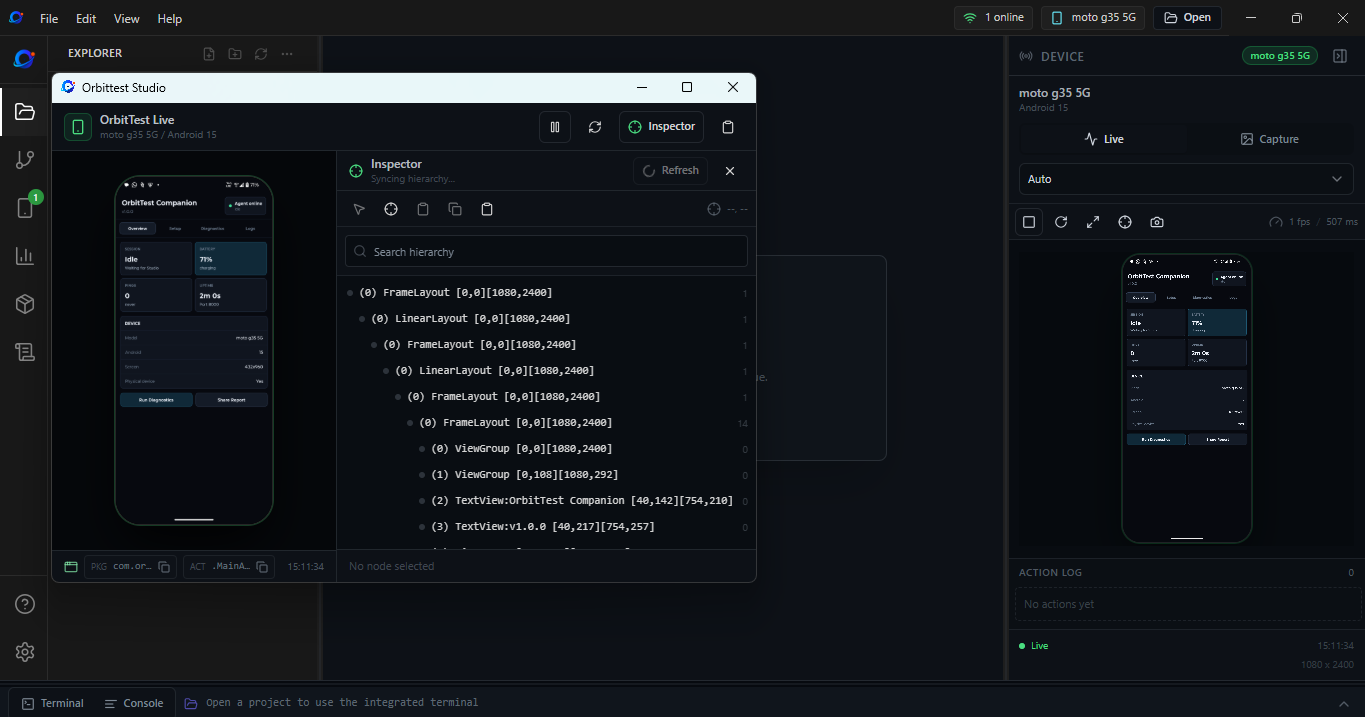
Android QA desktop IDE — live device mirror, UI inspector, logcat viewer, and mobile test runner in one Windows app.
Download Orbittest Studio
v1.0.0 · Windows 10+ x64 · MIT License
Windows SmartScreen: The installer is not yet Authenticode-signed. Click More info → Run anyway. Verify the SHA256 hash before running.
Features
Live Device Mirror
Stream your Android device's screen via the OrbiStream engine. Supports Auto, Low Latency, and High Quality modes.
UI Inspector
Dump and browse the UIAutomator hierarchy. Click any node to highlight it, copy its locator, or generate tap code.
Device Logs
Capture and filter Android logcat by package, PID, tag, severity, text, regex, or time range.
Mobile Test Runner
Write and run tests with one click. Live stdout/stderr streams to the Console panel with full artifact output.
Test Reports & Evidence
HTML reports with pass/fail status, action logs, final screenshot, and device recording with frame evidence player.
Built-in IDE
VS Code–style workspace: Monaco editor, file explorer, tabs, integrated terminal, Git, and npm manager.
Installation
-
1
Download the installer
Get
Orbittest-Studio-Setup-1.0.0.exefrom the releases page. -
2
Run the installer
Double-click the .exe and follow the prompts. If SmartScreen appears, click More info → Run anyway.
-
3
Enable USB debugging on your Android device
Settings → About Phone → tap Build Number 7 times → Settings → Developer Options → enable USB Debugging → connect via USB → tap Allow on the authorization prompt.
-
4
Install Orbittest Companion
Open Studio → your device appears in the Devices panel → click Install on the device card → approve prompts on the phone.
Quick Start
- 1
Open Studio and create a project
Click New Project or open an existing folder.
- 2
Create a test file
Create
tests/smoke.test.jsin your project. - 3
Write your test
Use the
orbittest/mobileAPI (see below). - 4
Select a device and run
Select your connected device in the Devices panel → choose a Run Configuration → click Run.
- 5
Review results
Watch the Console panel for live output, then open the Reports panel.
Mobile Test API
const { test, expect } = require('orbittest/mobile'); test('login smoke test', async (orbit) => { await orbit.wakeUp(); await orbit.launchApp('com.example.myapp', 'com.example.myapp.MainActivity'); await orbit.waitForId('username_field', 10000); await orbit.tapById('username_field'); await orbit.typeText('testuser@example.com'); await orbit.tapByText('Sign In'); await orbit.waitForText('Welcome', 10000); expect(await orbit.hasText('Welcome')).toBe(true); });
Key API Methods
| Category | Methods |
|---|---|
| App Lifecycle | launchApp, stopApp, installApp, uninstallApp, clearAppData, isAppInstalled |
| Gestures | tap, longPress, swipe, scrollDown, scrollUp |
| Text & Keys | typeText, clearText, pressKey |
| UI Lookup | tapById, tapByText, tapByDescription, hasText, hasId |
| Waits | waitForId, waitForText, waitForDescription, waitForGoneId, waitForGoneText |
| Device State | wakeUp, sleepScreen, isScreenOn, getScreenSize, getCurrentActivity |
| Evidence | screenshot, saveScreenshot, getLogcat, saveLogcat |
Run Configurations
| Configuration | Trace | Smart Report | Video Recording |
|---|---|---|---|
| Quick Run | Off | On | Always |
| Trace Run | On | On | Always |
| Evidence Run | On | On | Always |
| Minimal Run | Off | Off | Off |
Troubleshooting
Device not appearing
Run adb devices to confirm ADB is working and the device shows as device (not unauthorized). Try a different USB cable — some cables are charge-only. If ADB is not on PATH, set the ADB binary path in Studio Settings.
Device shows as "unauthorized"
Unlock the phone and tap Allow on the "Allow USB debugging?" dialog. If the prompt doesn't appear, unplug and replug.
Companion install blocked by Android
Go to Developer Options → Install via USB and enable it, then retry Install from Studio. Uninstall any previous version first.
Live mirror shows black screen
OrbiStream uses Android's MediaProjection API — approve the screen-capture permission dialog on the phone. If the stream stays black, tap Ping in the Devices panel to confirm the companion bridge is alive.
Installer Integrity
Verify the downloaded installer before running it.
# Verify with PowerShell
Get-FileHash .\Orbittest-Studio-Setup-1.0.0.exe -Algorithm SHA256
System Requirements
| Requirement | Details |
|---|---|
| OS | Windows 10 or later, 64-bit |
| Android | Android 8.0 (API 26) or later recommended |
| ADB | Bundled with Android Studio or standalone platform-tools |
| USB | USB data cable with USB debugging enabled on device |
| Optional | ffmpeg — enables WebM preview generation in test reports |
Release Validation — v1.0.0
| Check | Result |
|---|---|
| Prettier format check | ✓ Passed |
| ESLint | ✓ Passed |
| TypeScript typecheck | ✓ Passed |
| Vitest unit tests | ✓ 7 files, 32 tests passed |
| npm high-severity security audit | ✓ 0 vulnerabilities |
| Third-party license audit | ✓ Passed |
| Windows NSIS installer build | ✓ Passed |
| Bundled Companion APK verification | ✓ Passed |
Roadmap
OrbitTest is organized as a small set of Orbit-themed modules. Each has a clear job, and together they move a test from a user-written file to a real Chrome run with reports.
Architecture
🛸 Orbit Shell
Terminal surface. Parses commands, discovers .test.js files, passes the resolved test list to Mission Control.
⚙️ Orbit Core
Exposes test, expect, and run. Creates the Orbit object. Hides all WebSocket and CDP details.
🎛️ Mission Control
Registers tests, runs each in a fresh Capsule, tracks pass/fail, captures screenshots, writes JSON and HTML reports.
🧪 Orbit Capsule
Each test gets a clean browser profile — no cookies, history, or extensions from other tests.
🖱️ Orbit Surface
Resolves human intent to DOM elements using accessible names, labels, and visible text.
📡 Orbit Signal
Opens the WebSocket to Chrome's DevTools Protocol port, serializes commands, correlates async responses.
🚀 Orbit Launchpad
Finds Chrome (system, Puppeteer fallback, or ORBITTEST_CHROME_PATH), creates a temp profile, starts Chrome with remote debugging.
→ Execution Order
Shell → Core → Mission Control → Capsule → Surface → Signal → Launchpad → Chrome
Planned Improvements
Orbit Shell
- Clearer terminal output for missing files
- Headed/headless flag
- Command to open the latest HTML report
Orbit Core
- More natural wait helpers
- Better error messages for failed actions
- Keep the public API small and stable
Mission Control
- Test filtering by name
- Better CI-friendly output
- Improved parallel execution scheduling
Orbit Surface
- Stronger accessible-name matching
- Support for select boxes, checkboxes, file uploads
- Clearer diagnostics when multiple elements match
Contributing
Contributions are welcome. Please review the guidelines before opening a pull request.
- 1
Fork and branch
Fork the repo and create a branch from
master. Naming:feat/,fix/, orchore/. - 2
Make your changes
Plain JavaScript (CommonJS). Node.js 18 compatible. No transpilation, no build step. New modules must have a single clearly named responsibility.
- 3
Run the test suite
node --test tests/— all tests must pass. - 4
Open a pull request
Against
master. Include a clear description of what changed and why.
Security: To report a vulnerability, open a private security advisory on GitHub or contact the maintainer directly. Do not file public issues for security reports.
License
OrbitTest is licensed under the Apache License 2.0. Orbittest Studio is licensed under the MIT License.
Copyright 2026 Abhay. See LICENSE, NOTICE, and TRADEMARKS.md.