If you have written automated browser tests for any length of time, you know the ritual. You install Selenium, download a matching WebDriver binary, fight a version mismatch, finally get a browser to launch — and then spend the rest of the week chasing StaleElementReferenceException and adding Thread.sleep() calls to stop tests from failing at random.
Selenium earned its place in history. It was the first tool that let us drive a real browser with code, and for more than a decade it was the answer to “how do I test my web app end to end?” But software moved on. Web apps became single-page, JavaScript-heavy, and asynchronous. Teams started caring about test speed, readability, and — above all — reliability. And a new generation of tools appeared that does browser automation without Selenium at all.
This guide is for anyone asking, “Do I still need Selenium in 2026?” Whether you are a beginner writing your first end-to-end test or a senior QA engineer planning a migration, you will leave knowing what the modern options are, how they actually work, what code looks like in each, and how to choose. No prior Selenium experience required.
Table of Contents
- Why Teams Move Away From Selenium
- What “Browser Automation Without Selenium” Actually Means
- The Modern Alternatives at a Glance
- Playwright: The All-Rounder
- Cypress: The Developer Experience Favorite
- Puppeteer: Lightweight Chrome Control
- Intent-First Testing: A Different Philosophy
- Side-by-Side: The Same Test in Four Tools
- How to Choose the Right Tool
- Migrating Away From Selenium Without a Big Bang
- Best Practices for Reliable Browser Automation
- Common Mistakes
- Frequently Asked Questions
- Conclusion
Why Teams Move Away From Selenium
Before we talk about alternatives, it helps to understand why people look for them. The complaints are remarkably consistent across teams.
1. The setup is heavy. Classic Selenium needs three things to agree with each other: the Selenium library, a separate browser driver (ChromeDriver, GeckoDriver, etc.), and the browser itself. When Chrome auto-updates overnight, your driver can fall out of sync and every test fails the next morning — not because the app broke, but because the plumbing did.
2. The waiting model is fragile. Selenium does not natively know when the page has “finished.” Modern apps load data asynchronously, so elements appear after the initial page load. Teams paper over this with explicit waits, implicit waits, or — worst of all — fixed sleep() calls. The result is the single most hated phenomenon in QA: the flaky test that passes locally and fails in CI for no visible reason. (We wrote a whole guide on debugging flaky browser tests if that pain sounds familiar.)
3. Selectors are brittle. Selenium pushed many teams toward XPath and CSS selectors tied to implementation details — //div[@class='btn-primary'][2]. A designer renames a class, and your test dies even though the user experience is identical.
4. Speed and debugging. Each command makes a round trip to the WebDriver server over HTTP. It works, but it is not fast, and when something fails you often get a stack trace instead of a clear picture of what the page looked like at the moment of failure.
None of this means Selenium is “bad.” It means the defaults of newer tools are aligned with how the modern web actually behaves — automatic waiting, browser-native control, and selectors based on what the user sees.
What “Browser Automation Without Selenium” Actually Means
Let’s clear up a common confusion. Selenium is built on the WebDriver protocol — a W3C standard for controlling browsers. When people say “without Selenium,” they usually mean one of two things:
- A different control mechanism. Tools like Playwright and Puppeteer talk to the browser through the Chrome DevTools Protocol (CDP) (and Playwright’s own protocols for Firefox and WebKit) instead of the classic WebDriver server. This gives them finer control, automatic waiting, and the ability to intercept network requests.
- A different testing philosophy. Some tools change not just the mechanics but the way you describe a test — focusing on user intent (“click the Sign in button”) rather than locators (“find the element at this XPath”).
So “without Selenium” is really shorthand for “without the brittle WebDriver-plus-driver-binary workflow that most people associate with Selenium.” The goal is the same — drive a real browser — but the experience is dramatically smoother.
The Modern Alternatives at a Glance
Here are the tools we will cover, and where each one shines.
| Tool | Control mechanism | Languages | Best for | Auto-waiting |
|---|---|---|---|---|
| Playwright | CDP + native protocols | JS/TS, Python, Java, .NET | Cross-browser end-to-end testing | Yes |
| Cypress | Runs in the browser | JS/TS | Frontend teams, great DX | Yes |
| Puppeteer | Chrome DevTools Protocol | JS/TS | Chrome-only scripting, scraping, PDFs | Partial |
| Intent-first (OrbitTest) | Built on modern engines | Readable test syntax | Resilient, human-readable tests | Yes |
Every one of these does browser automation without the Selenium WebDriver workflow. Let’s look at each in turn, with real code.
Playwright: The All-Rounder
Playwright, maintained by Microsoft, is the tool most teams reach for when they leave Selenium. It drives Chromium, Firefox, and WebKit (the engine behind Safari) from a single API, and it bundles the browsers for you — so there is no separate driver binary to keep in sync.
Its killer feature is auto-waiting. Before Playwright clicks a button, it automatically waits for that button to be visible, enabled, and stable. You almost never write a manual wait again.
import { test, expect } from '@playwright/test';

test('user can log in', async ({ page }) => {
  await page.goto('https://example.com/login');

  // No manual waits — Playwright waits for each element automatically
  await page.getByLabel('Email').fill('user@example.com');
  await page.getByLabel('Password').fill('hunter2');
  await page.getByRole('button', { name: 'Sign in' }).click();

  // Assert on what the user actually sees
  await expect(page.getByText('Welcome back')).toBeVisible();
});
Notice the selectors: getByRole, getByLabel, getByText. These are user-facing locators — they find elements the way a human or a screen reader would, not by fragile CSS classes. Rename a <div>’s class and this test keeps passing.
Why people love it: true cross-browser support, network interception (mock an API mid-test), parallel execution out of the box, a built-in trace viewer that records a step-by-step replay of every failure, and codegen that writes tests as you click.
Trade-offs: the API surface is large, and the test runner has its own conventions to learn. But for serious end-to-end testing, it is the closest thing to a default choice in 2026.
Cypress: The Developer Experience Favorite
Cypress took a radically different approach: instead of controlling the browser from the outside, the test code runs inside the browser alongside your app. This gives it an unbeatable debugging experience — you watch your test execute step by step in a real browser, hover over any command to see a DOM snapshot, and use the browser’s own DevTools.
describe('Login', () => {
  it('lets a user sign in', () => {
    cy.visit('https://example.com/login');

    cy.findByLabelText('Email').type('user@example.com');
    cy.findByLabelText('Password').type('hunter2');
    cy.findByRole('button', { name: 'Sign in' }).click();

    cy.findByText('Welcome back').should('be.visible');
  });
});
Cypress automatically retries assertions until they pass or time out, which kills a whole category of flakiness. Frontend developers in particular love it because it feels like part of their existing JavaScript workflow.
Trade-offs: because it runs inside the browser, Cypress historically had limits around multiple tabs, multiple origins, and non-Chromium browsers. Recent versions have eased many of these, but if you need deep cross-browser coverage or to drive several tabs at once, Playwright is usually the better fit. Cypress is also JavaScript/TypeScript only.
Puppeteer: Lightweight Chrome Control
Puppeteer, from the Chrome team, is the most focused of the group. It drives Chromium through the DevTools Protocol and is ideal when you want programmatic control of Chrome rather than a full test framework — web scraping, generating PDFs, taking screenshots, or automating a repetitive browser task.
import puppeteer from 'puppeteer';

const browser = await puppeteer.launch();
const page = await browser.newPage();
await page.goto('https://example.com/login');

await page.type('#email', 'user@example.com');
await page.type('#password', 'hunter2');
await page.click('button[type="submit"]');

await page.waitForSelector('text/Welcome back');
await browser.close();
Puppeteer is lean and fast and has no opinions about how you structure tests — which is both its strength and its limitation. There is no built-in test runner, no cross-browser story beyond Chromium and (experimentally) Firefox, and you manage waiting and assertions yourself. For end-to-end testing, Playwright (which grew out of the same team) is usually the better choice; for scripting Chrome, Puppeteer is perfect.
Intent-First Testing: A Different Philosophy
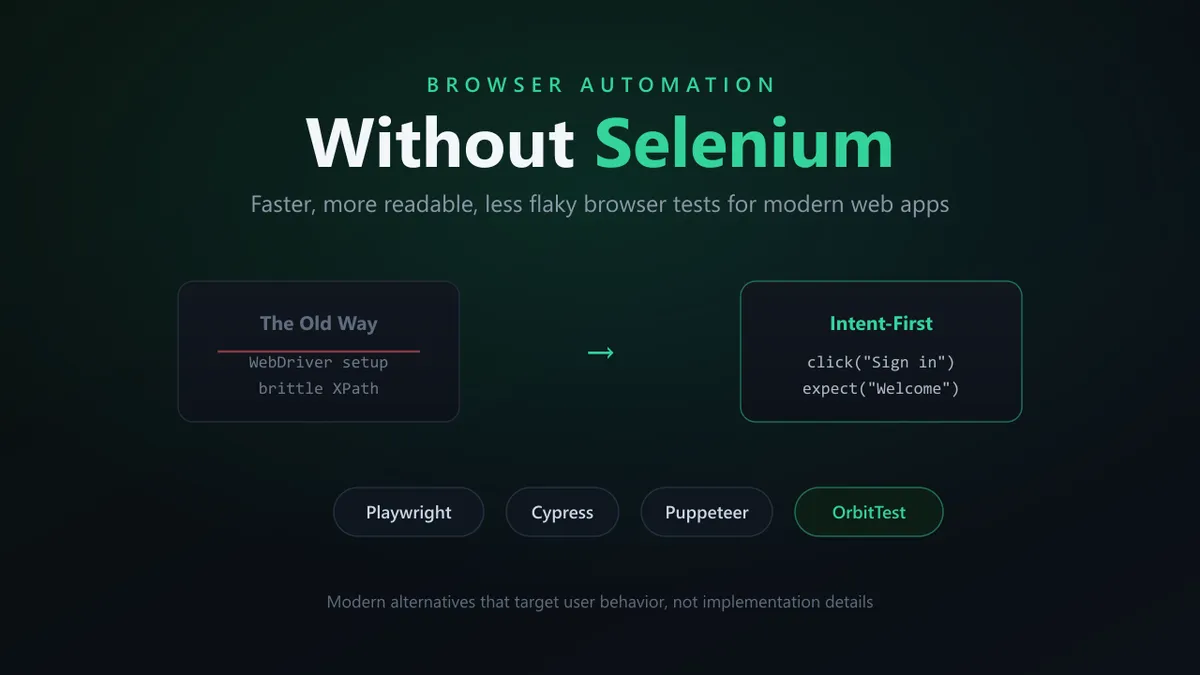
Everything above changes the mechanism of automation. Intent-first testing changes the language. The idea is simple: a test should describe what the user is trying to do, not how the page is built.
Compare these two ways of expressing the same step:
// Implementation-first (the Selenium habit)
driver.findElement(By.xpath("//form/div[2]/button[1]")).click();

// Intent-first
click("Sign in")
The first breaks the moment the form’s structure changes. The second keeps working as long as there is still a “Sign in” control — which is exactly the contract the user cares about. This is the philosophy behind OrbitTest, built around the principle that the most maintainable test is the one that reads like a description of user behavior.
A login test written this way reads almost like a sentence:
visit "/login"
type "user@example.com" into "Email"
type "hunter2" into "Password"
click "Sign in"
expect to see "Welcome back"
There is no WebDriver server to install, no driver binary to keep in sync with the browser, and no XPath to maintain. Under the hood it uses a modern, auto-waiting engine, so the flakiness that comes from manual sleep() calls largely disappears. The payoff shows up months later: when the UI is refactored, intent-first tests survive changes that would have turned a selector-based suite red. For teams whose biggest cost is maintaining tests rather than writing them, that resilience is the whole game.
Side-by-Side: The Same Test in Four Tools
Sometimes the clearest comparison is the code itself. Here is “log in and confirm the welcome message” expressed four ways.
| Step | Selenium (Java) | Playwright (JS) | Cypress (JS) | Intent-first |
|---|---|---|---|---|
| Open page | driver.get(url) | page.goto(url) | cy.visit(url) | visit "/login" |
| Enter email | findElement(By.id("email")).sendKeys(...) | getByLabel('Email').fill(...) | cy.findByLabelText('Email').type(...) | type ... into "Email" |
| Click button | findElement(By.xpath(...)).click() | getByRole('button', { name }).click() | cy.findByRole('button', { name }).click() | click "Sign in" |
| Assert result | wait.until(visibilityOf(...)) | expect(...).toBeVisible() | .should('be.visible') | expect to see "Welcome back" |
| Manual waits? | Usually required | Automatic | Automatic | Automatic |
The pattern is obvious: the modern tools push you toward user-facing locators and automatic waiting, which is precisely what removes the brittleness people associate with Selenium.
How to Choose the Right Tool
There is no single “best” tool — there is the best tool for your situation. Use this as a quick decision guide:
- You need broad cross-browser coverage (Chrome, Firefox, Safari/WebKit) and a full-featured test runner. Choose Playwright. It is the safest default for most end-to-end testing in 2026.
- Your team is frontend-heavy and lives in JavaScript, and developer experience matters most. Choose Cypress for its in-browser debugging and tight feedback loop.
- You are scripting Chrome — scraping, PDFs, screenshots — rather than building a test suite. Choose Puppeteer.
- Your tests break every time the UI is refactored, and maintainability is your biggest cost. Adopt an intent-first approach like OrbitTest, which targets user behavior and resists structural change.
These are not mutually exclusive. Plenty of teams script with Puppeteer, run end-to-end suites in Playwright, and lean on intent-first practices to keep those suites readable.
Migrating Away From Selenium Without a Big Bang
The biggest mistake teams make is trying to rewrite an entire Selenium suite in one heroic sprint. It rarely finishes. A safer, incremental path:
- Run both in parallel. Keep Selenium green while you stand up the new tool beside it. Nothing gets deleted on day one.
- Start with the flakiest tests. Migrate the tests that fail most often first — you get the biggest reliability win immediately and prove the new tool’s value to the team.
- Write new tests only in the new tool. Stop adding to the Selenium suite. The new suite grows while the old one freezes.
- Adopt user-facing locators as you go. Whatever tool you pick, switch from XPath and CSS-class selectors to role-, label-, and text-based locators. This is where the resilience comes from.
- Retire Selenium tests as their features are re-covered. Delete an old test only once its scenario is covered in the new suite. Eventually the old suite shrinks to nothing.
This approach keeps you shipping the whole time and avoids the classic “we’re 60% migrated and stuck forever” trap.
Best Practices for Reliable Browser Automation
Tools matter, but habits matter more. These apply no matter which option you choose:
- Select by what the user sees. Prefer accessible roles, labels, and visible text over CSS classes or XPath. Your tests become resilient and you incidentally check accessibility.
- Never use fixed
sleep(). Rely on the tool’s auto-waiting, or wait for a specific condition (an element, a network response). A hard-codedsleep(3000)is both slow and unreliable. - Keep tests independent. Each test should set up its own state and not depend on the order of others. Order-dependent suites are a flakiness factory.
- Mock or control external dependencies. A test that hits a real third-party API will eventually fail for reasons unrelated to your code. Intercept and stub network calls, or point at a controlled mock. (Our API-side companion, Orbittest Client, and its mock server tooling help here when your UI depends on backend responses.)
- Capture evidence on failure. Screenshots, traces, and videos turn “it failed in CI” into “here is exactly what happened.” Most modern tools do this automatically — turn it on.
- Run in CI from day one. A test suite that only runs locally protects nothing. Wire it into your pipeline early.
Common Mistakes
- Porting XPath selectors verbatim. Migrating off Selenium but keeping
//div[3]/span[2]locators carries the brittleness with you. The selectors are the problem — change them. - Adding manual waits “just in case.” Sprinkling
sleep()into a tool that already auto-waits makes tests slower without making them more reliable. Trust the auto-wait, or wait on a real condition. - Testing implementation, not behavior. Asserting on internal class names or DOM structure couples your test to refactors the user will never notice. Assert on what the user can see and do.
- One giant test that does everything. A 200-line test that logs in, navigates, fills forms, and checks ten things fails for unclear reasons and is impossible to debug. Keep tests small and focused.
- Ignoring the failure artifacts. Tools like Playwright record a full trace of every failure. Skipping past it to “just rerun the test” wastes the best debugging information you have.
Frequently Asked Questions
Is Selenium still relevant in 2026?
Yes, but its role has narrowed. Selenium remains valuable for very broad browser and language coverage, for legacy suites that already work, and in organizations standardized on the WebDriver ecosystem. For new projects, most teams choose Playwright, Cypress, or an intent-first approach because of automatic waiting, easier setup, and less flakiness.
What is the best alternative to Selenium?
For most end-to-end testing, Playwright is the strongest general-purpose alternative thanks to true cross-browser support and auto-waiting. Cypress is excellent for frontend teams who value developer experience. Puppeteer is best for scripting Chrome. If maintainability is your main pain, an intent-first tool like OrbitTest reduces test breakage by targeting user behavior.
Do these tools require WebDriver or a separate driver binary?
No. Playwright and Puppeteer control browsers through the Chrome DevTools Protocol (and native protocols), and they bundle the browsers they support — so there is no separate driver to keep in sync. Cypress runs inside the browser. This removes the version-mismatch failures common with Selenium plus ChromeDriver.
Can I use these alternatives for cross-browser testing?
Playwright supports Chromium, Firefox, and WebKit (Safari’s engine) from one API, making it the best choice for cross-browser testing. Cypress focuses on Chromium-family browsers with some Firefox and WebKit support. Puppeteer is primarily Chromium. Match the tool to the browsers you must cover.
Why are my Selenium tests so flaky, and will switching fix it?
Most Selenium flakiness comes from timing — the test acts before the page is ready — and from brittle selectors. Modern tools fix the timing problem with built-in auto-waiting, which removes a large share of flakiness immediately. Selector brittleness, though, is a habit: you also need to switch to user-facing locators to get the full benefit.
Do I need to know how to code to write browser tests?
You need some basic coding for Playwright, Cypress, and Puppeteer, since tests are written in JavaScript, TypeScript, or another language. Intent-first tools lower that bar by letting you describe tests in near-plain language focused on user actions, which makes them friendlier for testers who are newer to programming.
How long does it take to migrate from Selenium?
There is no fixed number, but the safest path is incremental rather than a full rewrite. Run the new tool alongside Selenium, migrate the flakiest tests first, write all new tests in the new tool, and retire old tests only as their scenarios are re-covered. Teams see reliability gains within the first few migrated tests.
Conclusion
Selenium opened the door to browser automation, and it deserves credit for it. But the modern web — asynchronous, component-driven, constantly refactored — rewards tools built for how applications behave today. Playwright gives you cross-browser power with automatic waiting. Cypress gives frontend teams a debugging experience that is hard to beat. Puppeteer gives you precise Chrome control. And intent-first testing changes the conversation entirely, letting your tests describe user behavior so they survive the refactors that would shatter a selector-based suite.
You do not have to pick one forever, and you do not have to migrate everything at once. Start with your flakiest tests, switch to user-facing locators, and let the new approach prove itself. The goal was never “use Selenium” or “don’t use Selenium” — it was always reliable tests that tell you the truth about your app, with the least maintenance possible.
If readable, resilient, intent-first tests sound like the direction you want, explore the OrbitTest docs or browse more browser testing articles to go deeper.
Written by Abhay Kumar — QA engineer and creator of OrbitTest, building practical tools for browser, mobile, and API testing. Browse more browser testing articles.