Open any app that keeps you logged in for days — your email, your bank, a food delivery app — and something interesting is happening that you never see. Behind the scenes, your login is quietly expiring and being renewed, over and over, sometimes every few minutes. You never notice, because the app was built not to bother you with it.
That whole quiet system runs on two small pieces of text called tokens — specifically an access token and a refresh token. They sound similar, and most explanations either drown you in cryptography or wave their hands and move on. This guide does neither. We’ll explain both in plain words, walk through exactly what happens the second an access token expires, and then answer the question most people actually came here for: what really happens if one gets stolen — and why that’s a much smaller disaster than it sounds.
No prior security knowledge needed. If you know what “logging in” means, you’re ready.
Table of Contents
- A Quick Analogy Before Any Jargon
- What Is an Access Token?
- What Is a Refresh Token?
- Access Token vs Refresh Token: Side by Side
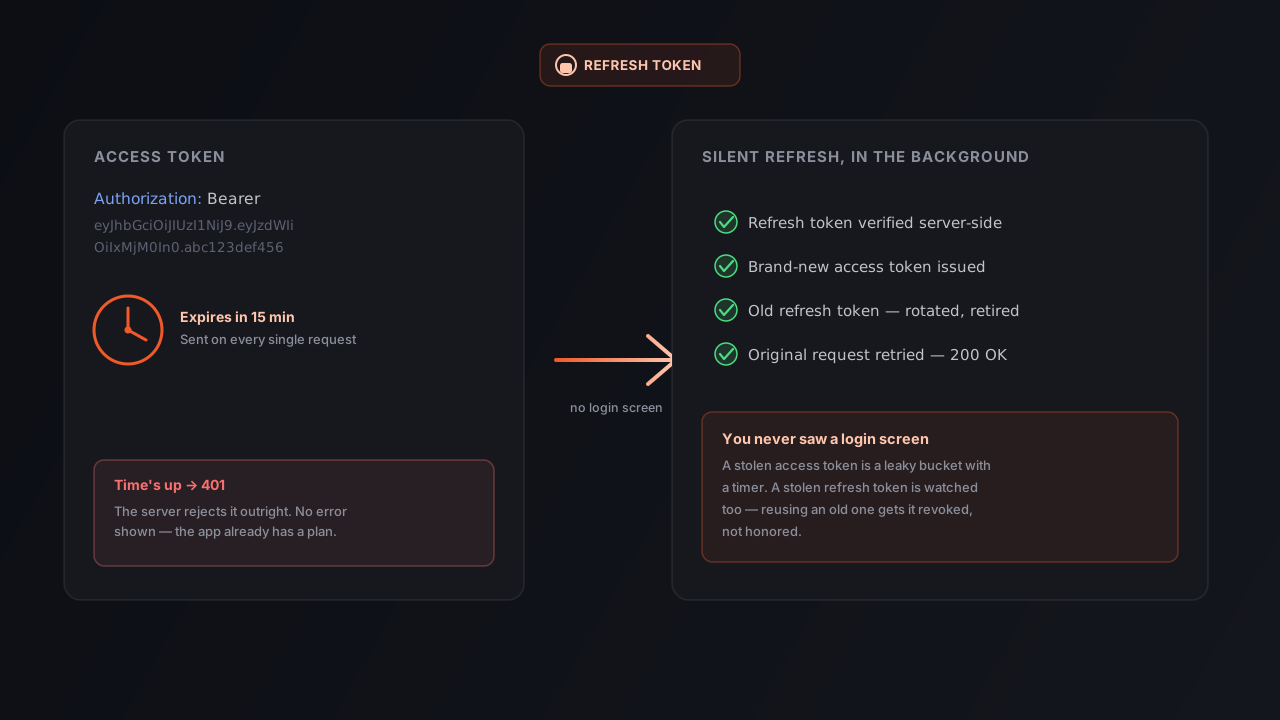
- What Actually Happens When Your Access Token Expires
- How the Refresh Token Gets You Back In, Step by Step
- What If the Refresh Token Is Also Expired or Invalid?
- What Happens If Someone Steals Your Access Token?
- What Happens If Someone Steals Your Refresh Token?
- Why Splitting One Token Into Two Is the Whole Trick
- Common Mistakes Beginners Make With Tokens
- How to Test This Yourself
- Frequently Asked Questions
- Key Takeaways
- Conclusion
A Quick Analogy Before Any Jargon
Think about checking into a hotel.
At the front desk, you show your ID and pay. In return, you get a room key card. That key card doesn’t prove who you are in any deep sense — it just opens door 214. It works for anyone holding it, it’s only good for a limited number of days, and if you lose it, the hotel deactivates that specific card and hands you a new one at the desk. You don’t have to show your ID again every time you want a new key — the front desk remembers you checked in, and can issue replacement cards on request until checkout.
That’s almost exactly the relationship between an access token and a refresh token:
- The key card is your access token — short-lived, used constantly, and disposable.
- Your checked-in status at the front desk is your refresh token — it’s what lets you get a new key card without re-showing your ID every single time.
Keep that picture in mind. Every section below is just this same idea, in more technical detail.
What Is an Access Token?
An access token is a small piece of text your app sends along with every single request it makes to a server, to prove “this request is really coming from a logged-in user.” It usually rides in an HTTP header that looks like this:
GET /api/profile HTTP/1.1
Host: api.example.com
Authorization: Bearer eyJhbGciOiJIUzI1NiIsInR5cCI6IkpXVCJ9.eyJzdWIiOiIxMjM0In0.abc123
A few things are true about access tokens almost everywhere you’ll see them used:
- They’re short-lived. Commonly somewhere between 5 and 15 minutes, sometimes up to an hour.
- They’re sent constantly. Every single API call — loading your profile, fetching a list, saving a change — attaches this token.
- The server checks them fast, without a database lookup, in most modern setups. Many access tokens are JWTs — the server can verify the token’s signature mathematically and trust what’s inside, instead of looking the user up every time. That’s part of why access tokens are so cheap to use on every request.
- They usually can’t be “cancelled early.” Because verifying one doesn’t require checking a database, the server generally can’t reach out and un-issue a token that’s already been handed out. It just has to wait for it to expire on its own. This one fact explains almost every design decision that follows.
If the access token is the only thing standing between a stranger and your account, and it can’t be cancelled early, you’d want it to expire as fast as humanly tolerable. That’s exactly why it does.
What Is a Refresh Token?
A refresh token is a longer-lived credential — typically valid for days or weeks — whose only job is getting you a brand-new access token once the old one expires. It is deliberately used far less often and treated with far more care:
- It’s not sent with normal requests. It never touches your
/profile,/orders, or/messagesendpoints. It’s only ever sent to one specific place: a dedicated token (or “refresh”) endpoint. - The server does keep track of it. Unlike a stateless access token, refresh tokens are typically recorded server-side — in a database or cache — specifically so they can be cancelled early. This is what makes a “log out of all devices” button possible.
- It lives longer, on purpose. Its entire reason for existing is to save you from re-entering your password every few minutes. If it expired as fast as the access token, it would be useless.
Back to the hotel: the refresh token is your reservation record at the front desk. It’s not something you hand a doorman on your way into every room — it’s what lets the desk staff hand you a new key card when the old one stops working, without you re-showing ID.
Access Token vs Refresh Token: Side by Side
| Access Token | Refresh Token | |
|---|---|---|
| Job | Proves your identity on every request | Gets you a new access token when the old one expires |
| Typical lifetime | Minutes (often 5–15) | Days to weeks |
| Sent with every API call? | Yes | No — only to the token/refresh endpoint |
| Can the server cancel it early? | Usually not (stateless) | Usually yes (tracked server-side) |
| Where it’s ideally stored | In memory / short-lived storage | HttpOnly cookie or secure device storage |
| Damage if it’s stolen | Limited — small time window, limited permissions | Serious — long time window, but mitigated by rotation and revocation |
| What gets you a new one | The refresh token | Logging in again with your password |
The pattern to notice: everything dangerous about a long-lived credential is pushed onto the refresh token, and everything the app does constantly is pushed onto the cheap, disposable access token. That split isn’t an accident — it’s the entire security model.
What Actually Happens When Your Access Token Expires
Here’s the exact sequence, stripped of jargon:
- Your app sends a request with the access token, as always:
GET /api/orders. - The server checks the token and notices its expiry time (the
expclaim, if it’s a JWT) has already passed. - The server rejects the request — almost universally with an HTTP
401 Unauthorizedstatus code, not a 403, not a crash, not a blank page. - That’s it. The access token doesn’t get “extended” or “renewed” by itself. It’s just dead. The server treats it exactly the same as a token that never existed.
If your app stopped here, you’d see a login screen every 15 minutes, which is exactly the annoying experience refresh tokens exist to prevent. So a well-built client doesn’t stop here — it catches that specific 401, and quietly starts the next step before you even notice a request failed.
How the Refresh Token Gets You Back In, Step by Step
This is the “silent refresh,” and it’s the part most people never see happen:
- The client detects the 401. Not any 401 blindly — specifically the “your access token is no good” kind, usually distinguished by an error code or header the API returns alongside the 401.
- The client sends the refresh token to a separate endpoint — commonly something like
POST /oauth/tokenorPOST /auth/refresh— never the same endpoint the original request was headed to. - The server looks the refresh token up in its own records. This is the step a stateless access token skips entirely. The server confirms the refresh token is real, hasn’t been revoked, and hasn’t already been used (more on why that check exists shortly).
- The server issues a brand-new access token — and, in most modern implementations, a brand-new refresh token too, replacing the old one. This is called refresh token rotation, and we’ll come back to why it matters.
- The client silently retries the original request with the new access token.
- You see a page load. That’s all. No login screen, no error, no visible delay in the common case.
In plain sequence, it looks like this:
1. GET /api/orders            (old access token)  →  401 Unauthorized
2. POST /auth/refresh         (refresh token)      →  200 OK, new access + refresh token
3. GET /api/orders            (new access token)   →  200 OK
Three requests happened where you only experienced one. That’s the entire trick behind “staying logged in” on apps that never seem to log you out.
What If the Refresh Token Is Also Expired or Invalid?
Then the silent recovery stops working, and there’s no way around it: the app has to send you back to a real login screen, where you type your password (or use whatever your original login method was) from scratch.
This happens when:
- The refresh token has simply outlived its own, longer expiry window (you haven’t opened the app in three weeks).
- It was explicitly revoked — you clicked “log out,” an admin forced a logout, or a security system flagged something suspicious.
- It failed reuse detection — someone already used this exact refresh token once before (we’ll get to exactly why that’s treated as an alarm, not a coincidence, in a moment).
This is also why refresh tokens can’t just live forever. A refresh token with no expiry, if it ever leaked once, would grant permanent access with no way to force a fresh login eventually. Giving it a longer life than the access token, but not an infinite one, is a deliberate middle ground.
What Happens If Someone Steals Your Access Token?
Here’s the honest, technically accurate answer, not the comfortable one: yes, a stolen access token can be used. An access token is what’s called a “bearer” token — whoever holds (“bears”) it can use it. There’s no additional password check baked into using one. If a copy of your access token ends up in someone else’s hands while it’s still valid, they can, in principle, make requests as you.
So why isn’t that the catastrophe it sounds like? Because several independent limits are stacked on top of each other, and an attacker has to get past all of them, not just one:
- The clock is against them. A token that expires in 5–15 minutes gives a thief a tiny window. By the time they’ve noticed they have it and done something with it, it may already be dead.
- It’s usually scoped. Well-designed APIs don’t hand out one all-powerful token. An access token is often limited to specific permissions (“read your profile,” not “change your password” or “delete your account”). Sensitive, high-impact actions frequently require a fresh login or a second confirmation step, regardless of what the access token allows.
- It can’t renew itself. An access token, on its own, cannot be exchanged for a new one — only a refresh token can do that. Once it expires, a thief holding only the access token is locked out completely; they never had the one credential that would have let them stay in.
- It normally travels encrypted. Over HTTPS, the token isn’t readable in transit — casually watching network traffic on public Wi-Fi doesn’t hand it over. The realistic ways an access token actually leaks are things like XSS (malicious JavaScript on a compromised page reading it out of storage) or a compromised device — not someone sniffing packets.
- Unusual use gets noticed. Plenty of production systems watch for a token suddenly being used from a new country or an impossible travel pattern, and can cut it off early even without a formal revocation mechanism.
Put together: a stolen access token is closer to finding someone’s hotel key card in a hallway than stealing their identity. It might open one door for a few minutes. It doesn’t get you a new key, doesn’t get you into the safe, and it stops working on its own — soon, and permanently.
What Happens If Someone Steals Your Refresh Token?
This is the one worth actually worrying about, and it deserves a straight answer instead of reassurance: a stolen refresh token is a much bigger deal, precisely because it’s built to last so much longer. If access token theft is a leaky bucket, refresh token theft is the tap itself.
That’s exactly why real systems don’t treat refresh tokens casually. The common defenses:
- It’s stored more carefully. The safer pattern keeps it in an
HttpOnlycookie, which JavaScript running on the page cannot read at all — closing the most common leak path (XSS) entirely. Storing it inlocalStorage, by contrast, means any injected script can simply read it out. - Rotation makes a copied token expire after one use. Every time a refresh token is legitimately used, the server destroys it and issues a new one. So even a perfectly stolen refresh token is only good until the real owner’s app happens to use it next — after which the stolen copy is already dead.
- Reuse detection turns theft into an alarm. Here’s the clever part: if an already-used (and therefore supposedly dead) refresh token is ever presented again, that’s not a coincidence — the only way it happens is if two different parties both have a copy of the same token. The server treats this as strong evidence of theft and revokes the entire chain of tokens descended from it, forcing both the attacker and the real user to log in again from scratch.
- It can be killed on command. Because the server tracks refresh tokens (unlike stateless access tokens), a “log out of this device” or “log out everywhere” button is simple to build — it just deletes the stored refresh token, and the next refresh attempt fails immediately.
None of this makes refresh token theft harmless. It makes it contained — bounded by rotation, watched by reuse detection, and killable on demand, instead of being a permanent, silent skeleton key.
Why Splitting One Token Into Two Is the Whole Trick
Step back and the design stops looking arbitrary. There’s a real tension at the heart of authentication: you want proof of identity that’s cheap to check on every request, but anything cheap to check can’t easily be cancelled early — and anything that can’t be cancelled early is dangerous if it leaks.
Splitting one credential into two resolves that tension instead of picking a side:
- The thing used constantly (the access token) is made cheap and disposable — short-lived enough that “can’t cancel it early” barely matters.
- The thing that’s dangerous if leaked (the refresh token) is used rarely, so it can afford to be checked against the server’s own records every time, tracked, rotated, and revoked.
This is the same principle as the hotel not trusting your face at every door on every floor, but also not making you show ID at the front desk every single time you want into your own room. Fast-and-frequent gets a disposable key. Rare-and-powerful gets a full check.
Common Mistakes Beginners Make With Tokens
- Storing tokens in
localStorage“because it’s easier.” It works, right up until one XSS bug on the page hands an attacker a long-lived credential in plaintext.HttpOnlycookies exist specifically to close this door. - Making the access token live longer “so users don’t get logged out as much.” This quietly defeats the entire design — a token that can’t be cancelled early and lasts hours instead of minutes has a much larger blast radius if it leaks.
- Skipping refresh token rotation. Without it, a single stolen refresh token stays valid for its entire lifetime — days or weeks — instead of being burned the moment the real user’s app refreshes next.
- Never actually testing the 401-then-refresh path. Plenty of apps are only ever tested on the happy path where the token is valid. What the UI does the moment a token expires — retry silently, show a spinner forever, or crash — usually isn’t discovered until a real user hits it.
- Treating “expired” and “invalid” identically. An expired token should trigger a refresh attempt. A token rejected for any other reason (tampered, wrong signature, revoked) shouldn’t — retrying it will just fail again.
How to Test This Yourself
You don’t need to trust an explanation blindly — this is genuinely easy to observe first-hand.
Start by looking inside a real token. Paste any JWT-based access token into the free JWT Debugger and check its exp claim — that’s the Unix timestamp it expires at. Watching that number tick past in real time is the fastest way to actually see an access token die.
Then watch the full cycle happen. In Orbittest Client, attach a bearer token to a request, store both the access token and refresh token as variables instead of copy-pasting them, and deliberately let the access token expire. Send the request again and confirm you get a 401. Then call your refresh endpoint with the refresh token, confirm you get a new access token back, and retry the original request — the exact three-step sequence from earlier in this guide, except now you’re triggering each step yourself and can see every response.
A good test matrix to build against your own API:
| Scenario | Expected result |
|---|---|
| Valid, unexpired access token | 200 OK |
| Expired access token | 401 Unauthorized |
| Expired access token, then refresh, then retry | 200 OK on the retry |
| Valid access token, no refresh token sent to a normal endpoint | Request works normally (refresh token isn’t needed here) |
| Expired or revoked refresh token | Refresh call fails; user must log in again |
| A refresh token reused after it was already rotated | Refresh call fails; ideally the whole token family is revoked |
Once these are automated, they become a regression suite that catches the day someone accidentally ships an access token that lives for 24 hours “just to fix a bug quickly.”
Frequently Asked Questions
What is the main difference between an access token and a refresh token?
An access token is a short-lived pass (usually 5–15 minutes) sent with every API request to prove who you are. A refresh token is a long-lived credential (days or weeks) that’s never sent with normal requests — it exists purely to get you a new access token once the old one expires, without asking you to log in again.
What happens when an access token expires?
The next request that uses it gets rejected, almost always with a 401 Unauthorized. A well-built app doesn’t show you this error — it catches the rejection, silently exchanges the refresh token for a new access token, and retries the original request in the background.
Can a stolen access token actually be used by an attacker?
Yes, technically — it’s a bearer token, so whoever holds it can use it while it’s still valid. But the practical damage is small: it typically expires within minutes, it’s often limited to specific permissions, it can’t generate a new token on its own, and it travels encrypted over HTTPS. The realistic theft paths are malicious JavaScript (XSS) or a compromised device, not network sniffing.
Is a refresh token more dangerous to lose than an access token?
Yes, considerably — it lives far longer, so it’s worth much more to an attacker. Applications compensate by storing it more carefully (often an HttpOnly cookie that JavaScript can’t read), rotating it on every use, and tracking it server-side so it can be revoked instantly, none of which applies to a stateless access token.
What is refresh token rotation and reuse detection?
Rotation means every time a refresh token is used, it’s immediately destroyed and replaced — so it’s good for exactly one exchange. Reuse detection means that if an already-used, dead refresh token is ever presented again, the server treats that as evidence of theft and revokes the entire chain of tokens descended from it, logging out the attacker and the real user alike.
Why not just make the access token last a long time and skip refresh tokens entirely?
Because that removes the safety net the whole design exists for. Access tokens are usually stateless, so the server can’t cancel one before it expires. Making it long-lived means a leaked copy stays useful for just as long. Keeping it short and pairing it with a refresh token gives you a small blast radius and a session that doesn’t force constant re-logins.
Where should a refresh token be stored in a web app?
The safest common default is an HttpOnly, Secure, SameSite cookie, which JavaScript can’t read at all — closing off theft via XSS. Storing it in localStorage is simpler to code but leaves it exposed to any injected script. On mobile, use the platform’s secure storage, such as the iOS Keychain or Android Keystore.
Key Takeaways
- An access token proves identity on every request and is meant to be short-lived and disposable.
- A refresh token’s only job is getting a new access token, and it’s the one the server actually tracks and can revoke.
- Expiry isn’t a bug — it’s a
401, caught silently, followed by a refresh and a retry you never see. - A stolen access token is a real risk, but a small one: short life, limited scope, no self-renewal, encrypted transport.
- A stolen refresh token is the bigger risk, contained mainly by rotation, reuse detection, and server-side revocation.
- The entire two-token design exists to balance “cheap to use constantly” against “dangerous if it leaks” — instead of picking one.
Conclusion
There’s no magic keeping you logged in for days at a time. There’s a short-lived access token quietly expiring every few minutes, a 401 response that never reaches your screen, and a refresh token working in the background to get you a new one — right up until it, too, eventually expires and asks you to log in for real.
Understanding that cycle changes how you think about “what if a token leaks.” The honest answer isn’t “it’s impossible” — it’s that the system is deliberately built so that whichever token leaks, the damage has a ceiling: minutes and limited permissions for an access token, one use and instant revocation for a refresh token. That’s not an accident. It’s the entire point of using two tokens instead of one.
Next, see this same idea inside a real, signed token structure in our JWT authentication guide, or zoom out to where access and refresh tokens fit alongside API keys and OAuth in API authentication, explained.
Written by Abhay Kumar — QA engineer and creator of OrbitTest, building practical tools for browser, mobile, and API testing. Browse more web security articles.