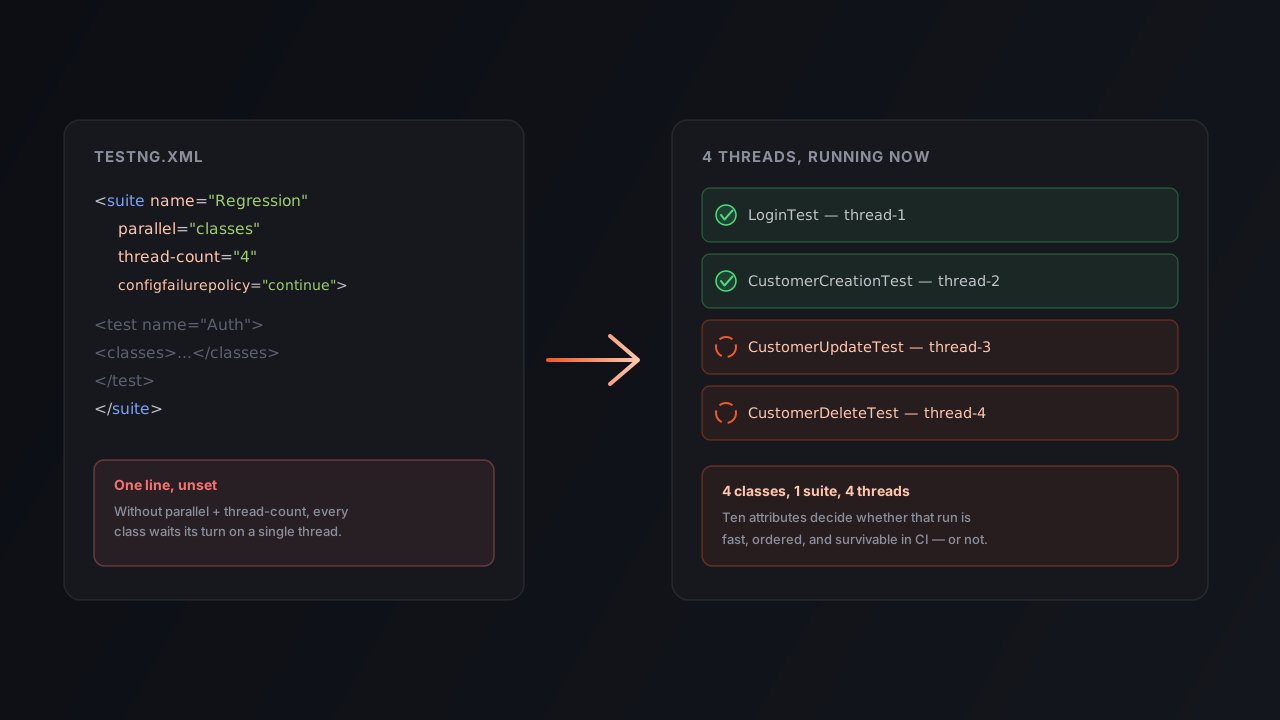
A five-class regression suite runs fine on a laptop in under three minutes. Point the same testng.xml at a CI runner with forty test classes, and the nightly job quietly creeps past forty minutes — not because the product got slower, but because nobody ever told TestNG it was allowed to use more than one thread. The suite file has ten or so attributes that decide exactly this kind of outcome, and most of them get copy-pasted once, from a tutorial, and never looked at again.
This guide covers the ten testng.xml suite and test attributes worth actually understanding — what each one controls, the defaults tutorials frequently get wrong, and a production-grade example that ties them together. Every default and attribute name below is checked against TestNG’s own DTD, not against how it’s usually paraphrased.
Table of Contents
- The two attributes everyone already sets
- How parallel and thread-count control concurrency
- Keeping execution order predictable
- Surviving a bad build in CI
- Two attributes you will rarely touch, but should recognize
- A production-grade TestNG suite, attribute by attribute
- Quick reference table
- Common mistakes
- Frequently asked questions
- Key takeaways
- Conclusion
The two attributes everyone already sets
name is the only required attribute on both <suite> and <test>. It isn’t cosmetic — it’s what shows up in Jenkins, Azure DevOps and Extent Reports, and it’s how a stack trace tells you which test block failed at 2 a.m. <suite name="Regression Suite"> and <test name="Customer Module Tests"> cost nothing and save real debugging time.
verbose sets console log detail from 0 (effectively silent — the default when the attribute is absent) to 10 (very detailed, down to individual TestNG internals). Level 1 or 2 is the sweet spot for CI: enough to see what ran without drowning the log. It can be set on <suite>, overridden per <test>, or passed on the command line, where the CLI flag wins.
How parallel and thread-count control concurrency
This pair is where most suites either get fast or stay accidentally slow, and it’s worth being precise about what each value of parallel actually does — TestNG’s docs and the community are consistent on this:
parallel="methods"— every@Testmethod runs in its own thread, including methods within the same class.parallel="classes"— each class gets its own thread; methods inside one class still run sequentially.parallel="tests"— each<test>block in the suite XML runs on its own thread.parallel="instances"— each object instance produced by a@Factoryruns on its own thread, which is the mode data-driven suites use when the same class is instantiated multiple times with different data.
The default is none — parallel execution is opt-in, not the starting state.
thread-count caps how many threads are available to whichever mode you picked. It defaults to 5 at the suite level, and here’s the part that trips people up: thread-count does nothing on its own. It only has an effect once parallel is set to something other than none — setting thread-count="20" with no parallel attribute changes nothing. It can also be overridden per <test>, so one noisy, flaky test block can run with fewer threads than the rest of the suite without touching anything else.
Match thread-count to the machine actually running the suite, not an arbitrary number. A value higher than the available CPU cores buys you diminishing returns and, on a shared CI runner, can make everything slower by starving other jobs.
Keeping execution order predictable
preserve-order is the attribute most tutorials describe backwards. It controls whether <classes> and <methods> run in the order they’re listed in the XML — and its default, per TestNG’s own DTD, is true. You don’t need to add preserve-order="true" to get ordered execution; you already have it. What setting it explicitly buys you is intent: it documents, for the next engineer, that the sequence matters (a UI journey like Create Customer → Edit → Delete, for instance), and it protects the suite if someone later sets it to false to let TestNG reorder methods for parallel scheduling efficiency.
group-by-instances is narrower: it changes how dependent methods are ordered when a class has been instantiated multiple times by a @Factory — for example, several instances of the same test class, each carrying different data. With it set to true, TestNG finishes all of one instance’s dependent-method chain before moving to the next instance, instead of interleaving them. It defaults to false and matters only in factory-driven, data-per-instance designs.
Surviving a bad build in CI
Two attributes decide how gracefully a suite handles failure rather than product code.
configfailurepolicy governs what happens after an @BeforeMethod or @BeforeClass fails. The default, skip, skips every @Test that depended on it — usually the right call, since a test can’t be trusted after its setup broke. Switching to continue runs the dependent tests anyway; it’s most useful on large regression suites where you’d rather see every test’s individual result than have one broken login helper mask a hundred unrelated failures. This one is suite-level only — there’s no <test>-level override in the DTD.
skipfailedinvocationcounts is about retries via invocationCount. If a method is set to run five times and the first run fails, leaving this true stops the remaining four from executing — useful in load or stress-style tests where re-running a method that’s already proven broken just wastes CI minutes. It defaults to false and can be set on both <suite> and <test>.
Two attributes you will rarely touch, but should recognize
junit="true" switches TestNG’s discovery to JUnit-compatible mode, so it recognizes JUnit-style test classes and lifecycle methods. It’s mainly a migration tool — a way to run a legacy JUnit 3/4 suite under the TestNG runner while you convert tests over incrementally, rather than a setting you’d choose for a suite written for TestNG from the start.
data-provider-thread-count is easy to confuse with thread-count, but it’s a distinct, suite-level-only attribute (default 10) that controls concurrency for a different thing entirely: how many threads execute the invocations a single @DataProvider produces. If your data-driven method has 50 rows of input and the data provider is marked parallel = true in its @DataProvider annotation, this is the setting that decides how many of those 50 run at once — independent of whatever thread-count is doing for methods, classes, or instances elsewhere in the suite.
A production-grade TestNG suite, attribute by attribute
<?xml version="1.0" encoding="UTF-8"?>
<!DOCTYPE suite SYSTEM "https://testng.org/testng-1.0.dtd">
<suite name="Full Regression Suite"
       parallel="classes"
       thread-count="4"
       verbose="2"
       preserve-order="true"
       configfailurepolicy="continue"
       skipfailedinvocationcounts="true">

  <test name="Authentication Tests">
    <classes>
      <class name="com.shop.tests.LoginTest"/>
      <class name="com.shop.tests.LogoutTest"/>
    </classes>
  </test>

  <test name="Customer Module Tests">
    <classes>
      <class name="com.shop.tests.CustomerCreationTest"/>
      <class name="com.shop.tests.CustomerUpdateTest"/>
      <class name="com.shop.tests.CustomerDeleteTest"/>
    </classes>
  </test>
</suite>
Read top to bottom: the <!DOCTYPE> line points at TestNG’s DTD, which is what gives most IDEs attribute autocomplete and inline docs — worth keeping even though TestNG’s own XML reader doesn’t strictly validate against it at runtime. parallel="classes" plus thread-count="4" means the five classes across both <test> blocks share four threads. configfailurepolicy="continue" keeps the whole suite reporting even if one @BeforeClass breaks. And preserve-order="true" is written out deliberately, even though it’s the default, because the Customer module’s three classes read like a workflow and the next engineer should know that’s intentional.
Quick reference table
| Attribute | Scope | Default | What it controls |
|---|---|---|---|
name | suite, test | required | Label shown in reports and CI logs |
verbose | suite, test | 0 | Console log detail, 0 (silent) to 10 |
parallel | suite, test | none | Unit of concurrency: methods, classes, tests, or instances |
thread-count | suite, test | 5 | Max threads for whichever unit parallel names |
preserve-order | suite, test | true | Run classes and methods in XML-listed order |
group-by-instances | suite, test | false | Order of dependent methods across factory instances |
configfailurepolicy | suite only | skip | skip or continue dependent tests after a config failure |
skipfailedinvocationcounts | suite, test | false | Stop re-running invocationCount retries after one failure |
junit | suite, test | false | Run in JUnit-compatible discovery mode |
data-provider-thread-count | suite only | 10 | Threads for a single @DataProvider’s parallel invocations |
Common mistakes
- Setting
thread-countwithoutparallel. It’s silently a no-op — the suite still runs single-threaded. - Assuming
preserve-order="false"is needed for parallel runs. It isn’t; parallel execution and listed order aren’t mutually exclusive, andtrueis already the default. - Mis-casing an attribute.
configFailurePolicyorskipFailedInvocationCountswon’t error — TestNG just won’t recognize them, and the suite quietly keeps the default behavior. - Setting
thread-countfar above available CPU cores. On a shared CI runner this can slow the whole pipeline down rather than speed the suite up. - Confusing
thread-countwithdata-provider-thread-count. They govern different concurrency layers and don’t substitute for each other.
Frequently asked questions
Q: What does the parallel attribute do in testng.xml?
It tells TestNG which unit of execution to split across threads — methods, classes, tests, or Factory-created instances. The default is none, so nothing runs in parallel until you set it.
Q: Does thread-count do anything without the parallel attribute?
No. It caps the thread pool for whichever mode parallel names, and has no effect on its own. It defaults to 5 and can be overridden per <test>.
Q: Is preserve-order=“true” something you need to add manually? No — it’s already the default. Writing it out documents intent rather than changing behavior.
Q: What’s the difference between configfailurepolicy and skipfailedinvocationcounts?
configfailurepolicy decides whether @Test methods run after their @Before config fails (skip, the default, or continue). skipfailedinvocationcounts decides whether a method’s remaining invocationCount retries still run after the first one fails.
Q: Are TestNG suite XML attribute names case-sensitive? Yes, and they’re lowercase, with no camelCase — a mismatch is silently ignored rather than flagged as an error.
Q: What is data-provider-thread-count, and how is it different from thread-count?
It’s a separate, suite-level-only attribute (default 10) for how many threads run a single @DataProvider’s invocations, independent of the main thread-count.
Key takeaways
parallelandthread-countare a pair — the second does nothing without the first.preserve-orderis alreadytrueby default; set it explicitly for documentation, not for behavior.configfailurepolicyanddata-provider-thread-countare suite-level only — there’s no<test>-level override.- Attribute names are lowercase and unforgiving of typos; a wrong one is ignored, not rejected.
- Match
thread-countto real CPU cores, and keepverboseat 1–2 in CI.
Conclusion
None of these ten attributes are exotic, and none of them require touching a line of Java. What they require is reading the suite file as carefully as the test classes it drives — because a mistyped attribute name or a thread-count with no parallel attribute next to it won’t throw an exception. It’ll just quietly run the way it always has, and the only symptom is a nightly job that takes longer than it should.
If you’d rather not hand-assemble the tags, the TestNG XML Generator builds a valid testng.xml from a form — parallel mode and thread-count, cross-browser test blocks, smoke and regression group includes/excludes, listeners and suite parameters — and copies it out ready to run.
Further reading: TestNG’s official documentation, the testng-1.0.dtd referenced by every suite file’s <!DOCTYPE> line, and API Tests That Fail on Purpose for how the same parallel and thread-count attributes apply to a REST Assured API suite, not just Selenium.
Written by Abhay Kumar — QA engineer and creator of OrbitTest, building practical tools for browser, mobile, and API testing. Browse more browser testing articles.