Most of what gets called “AI in test automation” happens before the test run: a model drafts some test cases or scaffolds a page object, and then the AI leaves the room. I recently built a regression suite for an SDET assessment with an unusual constraint that pushed past that — AI wasn’t just allowed, it was the point. The brief demanded AI at every stage of the workflow: scaffolding, test case generation, and finally inside the running framework itself.
The result is a Playwright framework where a local LLM analyzes every test failure in real time and writes its verdict — explanation, likely root cause, suggested fix, confidence — straight into the HTML report. It runs on Ollama, fully offline, with no API key and no test data leaving the machine.
The full code is on GitHub: github.com/abhay-1994/testmu-sdet1-Abhay — everything in this post is runnable from that repo. This article walks through the decisions behind it, the prompt engineering that fed it, and a few honest lessons about what AI in a test framework actually looks like in practice — including the part where the model’s analysis was convincingly wrong.
Key takeaways
- AI-native means AI at runtime, not just at authoring time. The centerpiece here is a failure explainer: an
autoPlaywright fixture that gathers context on failure and asks an LLM to explain what went wrong, inside the same test run. - A local model is genuinely enough for triage. Ollama +
llama3.2runs the whole integration offline — no account, no billing — and JSON Schema structured outputs guarantee the response parses. - AI features must fail closed. If Ollama isn’t running, the fixture degrades to a plain-text note and the suite carries on. An observability add-on should never take down the thing it observes.
- Vague prompts fail quietly, not loudly. A lazy prompt returns test cases that look fine but lack structure, tags, thresholds, and security edge cases — you have to demand those by name.
- Verify your own AI narrative. Re-running all six generation prompts against a real model caught three places where the write-up overstated the vague prompts’ weaknesses.
- Small-model analysis is a triage accelerator, not an oracle. The API-side verdict was exactly right; the UI-side verdict was plausibly wrong — and documenting that is more useful than hiding it.
Table of Contents
- What “AI-native” actually means in a test framework
- The setup: real apps standing in for a spec
- Prompt engineering for test case generation: vague vs refined
- Verifying my own AI narrative
- The failure explainer: an LLM inside the Playwright run
- Why a local LLM instead of a cloud API
- What the model actually said
- What the AI was not allowed to do
- Lessons for building AI into your own framework
- Frequently asked questions
- Conclusion
What “AI-native” actually means in a test framework
An AI-native test framework is one where AI participates in the workflow itself rather than being a one-off code generator. Concretely, that means three layers:
- Scaffolding — AI helps design the project structure, configs, and fixtures.
- Test design — AI generates test cases from engineered prompts, with the iteration between vague and refined prompts kept as a first-class artifact.
- Runtime intelligence — AI operates inside the running suite, turning raw failures into structured, human-readable analysis.
The third layer is the one most frameworks never reach, and it’s where this project spends most of its effort. It’s a different proposition from the “self-healing locators” pitch you’ll see in commercial tools: nothing here mutates your tests or hides failures. The failures stay red — the framework just arrives at your report already carrying a first-pass root-cause analysis, the same way a good teammate would triage a CI run before you open the trace. If you’ve read our breakdown of what an observational study found about developers writing tests with AI, this is the same philosophy applied at runtime: let AI draft the explanation, keep the human as the verifier.
The setup: real apps standing in for a spec
The assessment described a web-based test management platform — login, dashboard, REST API — but provided no live instance and no credentials. That left two options: write tests that could never execute, or find real, public applications that map onto the same modules. I chose the second:
- Login + Dashboard → the public OrangeHRM demo: a real login form, real session behavior, and a dashboard composed of independently loading widgets.
- REST API → DummyJSON: real authentication with bearer tokens, full CRUD, genuine 4xx error codes, no API key needed.
That choice turns every test in the repo into an executable one — a reviewer can clone and run the suite against live targets rather than reading aspirational code.
One decision I’m particularly glad about: the assessment listed brute-force account lockout as a scenario. I wrote it up as a Gherkin test case — and deliberately did not automate it. Running repeated failed logins against a shared public demo would lock the Admin account for everyone else using it. A test suite that breaks a shared environment isn’t thorough; it’s careless. The scenario ships as documentation with an explicit safety warning instead.
Prompt engineering for test case generation: vague vs refined
The task required showing the iteration, not just the final output — so for each module the repo keeps both versions: the deliberately vague first prompt and the refined one.
The vague version, in its entirety:
Write test cases for the login page.
This actually returns more than you’d expect — eleven test cases, including session timeout and repeated failed attempts. But it’s unusable as-is. There’s no Gherkin structure, no tags, no explicit lockout threshold, and none of the security edge cases a login suite needs. Case sensitivity, leading/trailing whitespace, SQL-injection-shaped input — none of it appears unless you ask by name.
The refined prompt reads less like a question and more like a contract. It:
- names all five required coverage areas explicitly — happy path, negative, security, session, and UI validation;
- forces structure —
Background:blocks,Scenario OutlinewithExamplestables; - imposes a tagging scheme —
@login @smoke @negative @security— so cases route into the right suites from day one; - demands testable thresholds — “locked after 5 consecutive failed attempts within 15 minutes,” because a lockout scenario without a number is a wish, not a test;
- requires the safety caveat in the output itself — the don’t-run-this-against-a-shared-environment warning travels with the test case, not just the README.
The difference between the two isn’t that the vague prompt produces garbage. It’s that vague prompts fail quietly: the output looks fine until you try to hand it to an automation engineer, and only then do you discover everything it silently omitted. Structure, tags, thresholds, and edge cases have to be demanded by name — the same discipline that makes boundary value analysis and equivalence partitioning reliable applies to prompt design.
Verifying my own AI narrative
Here’s the part most people skip. The assessment said reviewers would run my prompts themselves — so before writing a word about them, I re-ran all six prompts (vague + refined, across three modules) against a real model and compared the actual output to my claims about it.
That check caught three places where I’d overstated the vague prompts’ weaknesses. The content I claimed was missing was actually present — it was just unstructured. I corrected the write-up rather than leave a plausible-sounding but wrong narrative in place. If you claim an AI produced X, check that it actually does; “sounds right” is exactly the failure mode LLMs train us into.
The verification also surfaced something genuinely useful about prompt robustness across model sizes: the refined prompts hit the right topics even on a much smaller model, but formatting compliance — tags, no duplicate scenarios, no stray commentary — degraded noticeably. Prompt design does real work independent of the model, but output fidelity still depends on model capability. If your team standardizes prompts, test them on the weakest model anyone might actually use.
The failure explainer: an LLM inside the Playwright run
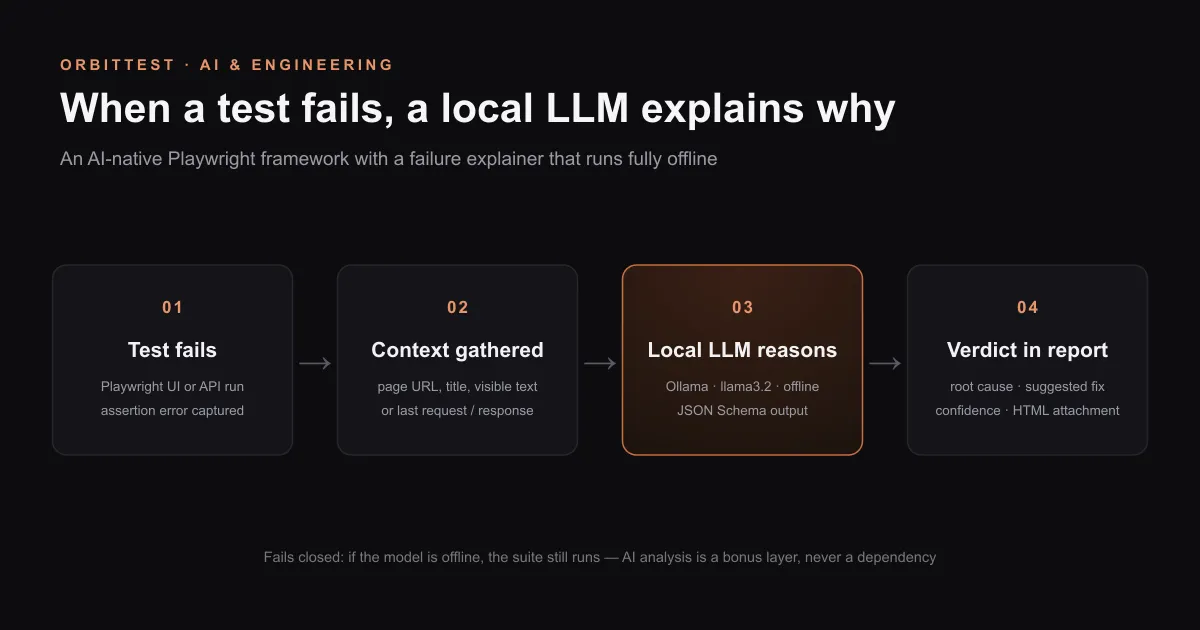
The centerpiece of the framework is the Failure Explainer: when any Playwright test fails, a fixture gathers the evidence and asks an LLM to explain what went wrong — in real time, inside the same test run.
The architecture in four steps:
- An
autofixture runs after every test in both the UI and API projects — no test has to opt in. - On failure, it gathers context: page URL, title, and visible text for UI tests; the last request/response pair for API tests.
- It sends that context plus the error message to the model and receives a structured verdict:
{ explanation, likelyRootCause, suggestedFix, confidence }. - The verdict is attached via
testInfo.attach(), so it appears as a markdown attachment inside the Playwright HTML report, right next to the trace and screenshot. A custom reporter also prints a summary table at the end of the run.
Condensed to its essential shape (the full implementation is in the repo):
// fixtures.ts — condensed for clarity
export const test = base.extend<{}, {}>({
  failureExplainer: [
    async ({ page }, use, testInfo) => {
      await use(undefined);
      if (testInfo.status !== testInfo.expectedStatus) {
        const context = await gatherPageContext(page); // URL, title, visible text
        const verdict = await explainFailure(testInfo.error, context);
        await testInfo.attach('ai-failure-analysis', {
          body: renderMarkdown(verdict),
          contentType: 'text/markdown'
        });
      }
    },
    { auto: true }
  ]
});
Two design decisions carry most of the weight here.
Structured outputs, not string parsing. Ollama accepts a JSON Schema as the format field of the request and constrains generation to match it. The response is guaranteed to parse into the exact shape the reporter needs — no regex extraction, no “the model added commentary again” retry loops:
const res = await fetch('http://localhost:11434/api/chat', {
  method: 'POST',
  body: JSON.stringify({
    model: 'llama3.2',
    messages: [{ role: 'user', content: buildPrompt(error, context) }],
    format: verdictSchema, // JSON Schema: explanation, likelyRootCause, suggestedFix, confidence
    stream: false
  })
});
The integration fails closed. If Ollama isn’t running, the fixture attaches a plain-text explanation of that fact and the suite carries on, fully green-or-red on its own merits. An AI add-on should never be able to take down the test run it’s observing — the same principle that separates good observability tooling from bad.
One more problem had to be solved: a failure explainer is undemonstrable if nothing fails, and you can’t summon a real bug on demand. So two tests, tagged [AI-DEMO], carry deterministic wrong assertions — one exercising the page-context path, one the API-context path — so every single run produces genuine failures for the model to analyze. If you’ve spent time debugging flaky browser tests, you’ll appreciate the inversion: these are the only tests in the suite designed to be reliably red.
Why a local LLM instead of a cloud API
I used Ollama running locally, not a hosted API, and the reasoning generalizes to any team weighing the same call:
| Concern | Local (Ollama + llama3.2) | Cloud frontier model |
|---|---|---|
| Reviewer setup | ollama pull llama3.2 + npm test | Account, API key, billing |
| Cost per run | Free | Per-token, scales with failures |
| Privacy | Test data never leaves the machine | Page text / API payloads leave the network |
| Works offline / in CI without secrets | Yes | No |
| Reasoning sharpness | Good triage, occasional wrong root cause | Noticeably sharper analysis |
For a failure explainer, the left column wins more often than you’d think: triage doesn’t need frontier-model reasoning to be useful, and “clone, pull a model, run” beats “get an API key” for anything a reviewer or teammate has to reproduce. The trade-off is real, though — and it’s exactly the decision a real team would have to make, which is why the code keeps the provider behind a thin boundary, leaving the door open for a pluggable cloud model where sharper reasoning justifies the key management.
What the model actually said
Here’s real, unfiltered output from a run — not cherry-picked:
{
  "test": "[AI-DEMO] product schema check with a deliberately wrong expectation",
  "analysis": {
    "explanation": "The test failed because it expected the category of a product to be 'electronics', but the actual response from the API showed 'beauty'.",
    "likelyRootCause": "Inconsistent or incorrect data in the product schema",
    "suggestedFix": "Verify that the product schema is correctly defined and updated with the correct categories...",
    "confidence": "high"
  }
}
The API-side analysis is exactly right: it names the expected value, the actual value, and where the mismatch lives.
The UI-side analysis, interestingly, is plausibly wrong: the model suggested the locator was incorrect, when the real defect was the test’s expected string. I documented that in the repo instead of hiding it, because it’s the honest lesson of the whole exercise — a small local model infers a believable root cause from the evidence, not always the correct one. It’s a triage accelerator, not an oracle. It gets you from “something’s red” to “here’s the first hypothesis to check” in zero human minutes; a person still confirms the diagnosis. That failure mode — confident, coherent, wrong — is the same one the TU Delft study on AI-written unit tests found in generated assertions, showing up here at analysis time instead of authoring time.
What the AI was not allowed to do
I kept an AI usage log of every task the AI performed while building the framework. Just as important is what it was not allowed to do:
- No fabricated sample output. At one point no model was available locally to capture a genuine response. Instead of inventing one, the gap was closed properly — install Ollama, run the suite, capture real output.
- No guessed selectors. Selectors were discovered by driving a real headless browser against the live applications. That step caught a wrongly guessed mobile hamburger selector and revealed that the originally planned API target now requires a paid key — found by an actual failed request, not an assumption. Assertions should be grounded in what’s really on the page, not what you assume is there.
- No unsafe automation against shared public infrastructure — the account-lockout scenario stayed documentation-only, as covered above.
These guardrails are the unglamorous half of “AI-native.” A framework that lets AI fabricate evidence, guess at selectors, or hammer shared demos isn’t AI-native — it’s just unsupervised.
Lessons for building AI into your own framework
- Vague prompts don’t fail loudly — they fail quietly. The output looks fine until you hand it to an automation engineer. Structure, tags, thresholds, and edge cases must be demanded by name, and the vague-to-refined iteration is worth keeping as an artifact.
- Verify your own AI narrative. Re-running my prompts caught inaccuracies in my own write-up about them. Any claim of the form “the AI produced X” deserves the same verification you’d apply to a test assertion.
- AI features in test frameworks must fail closed. The LLM analysis is a bonus layer; the suite must be fully functional — and fully trustworthy — without it. Wire the fallback before you wire the happy path.
- Local models are genuinely viable for failure triage. A failure explainer doesn’t need frontier-model reasoning to earn its place, and a zero-key setup dramatically lowers the barrier for everyone who has to reproduce your work. Decide deliberately, and keep the provider pluggable.
Frequently asked questions
What is an AI-native test automation framework?
A framework where AI participates in the workflow at every stage — scaffolding, test case generation, and runtime failure analysis — rather than being used once to generate code and then removed. The defining feature is AI inside the running framework: here, an LLM that reads the evidence from every failed Playwright test and attaches a root-cause verdict to the HTML report.
Can an LLM explain why a Playwright test failed?
Yes. An auto Playwright fixture runs after every test; on failure it gathers context — page URL, title, and visible text for UI tests, or the last request/response pair for API tests — and sends it with the error to an LLM. The structured verdict is attached via testInfo.attach(), so it appears inside the Playwright HTML report next to the trace and screenshot.
Do I need a cloud API key to add AI failure analysis to Playwright tests?
No. Ollama running locally with a small model like llama3.2 covers the entire integration offline — no account, no API key, no billing, and no test data leaving your machine. The trade-off is reasoning sharpness: a hosted frontier model analyzes failures more precisely, at the cost of key management, per-token spend, and sending page content off-network.
How do you force an LLM to return valid JSON for a test report?
Use structured outputs. Ollama accepts a JSON Schema in the request’s format field and constrains generation to match it, so the response always parses into the exact shape the reporter expects — { explanation, likelyRootCause, suggestedFix, confidence } — with no string extraction or retry loops.
How accurate is AI failure analysis from a small local model?
Treat it as a triage accelerator, not an oracle. In real output from this framework, the API-side verdict was exactly right, while the UI-side verdict was plausible but wrong — it blamed the locator when the test’s expected string was the defect. The model infers a believable cause from the evidence; a human confirms the diagnosis.
How do you demo an AI failure explainer if all the tests pass?
Ship deliberately failing tests. This framework includes two tests tagged [AI-DEMO] with deterministic wrong assertions — one for the page-context path, one for the API-context path — so every run produces genuine failures for the model to analyze and the integration stays reviewable on demand.
Conclusion
The most durable idea in this project isn’t any single piece of code — it’s the division of responsibility. AI drafts test cases; engineered prompts and a human reviewer make them usable. AI explains failures; deterministic structure (JSON Schema), a fail-closed design, and honest documentation of its wrong answers make it trustworthy. At every layer, the AI accelerates and the framework verifies.
That’s what “AI-native” should mean in test automation: not tests that heal themselves or reports that hide red, but a suite that arrives at your desk already triaged — by a model that costs nothing, runs anywhere, and is never allowed to break the thing it’s watching.
Explore the full implementation, all six prompts, and the complete AI usage log here: github.com/abhay-1994/testmu-sdet1-Abhay.
Credits & references: Built with Playwright (automatic fixtures, testInfo.attach()), Ollama with structured outputs running llama3.2, the public OrangeHRM demo, and DummyJSON. The observational research on AI-assisted test writing referenced above is covered in our summary of Ardic, Le Dilavrec & Zaidman (2026).
Written by Abhay Kumar — QA engineer and creator of OrbitTest, building practical tools for browser, mobile, and API testing. Browse more AI & Engineering articles.