Ask any experienced tester where the bugs really live and you’ll hear the same answer: the edges. Not the happy path where a user types a sensible age of 30, but the moment someone enters 0, or 200, or leaves the field blank, or pastes a name that’s one character too long. These are the cases that crash forms, corrupt data, and slip through to production — and they’re exactly the cases that get skipped when you’re testing under time pressure.
Two techniques exist to catch them: boundary value analysis and equivalence partitioning — decades old, on every QA syllabus, and still the highest-leverage way to test input validation. The catch: applying them by hand for every field is tedious enough that people quietly cut corners.
This guide explains both with worked examples, then shows how to generate the cases automatically instead of building grids in a spreadsheet.
Table of Contents
- Why most input bugs hide at the edges
- Equivalence partitioning: test less, cover more
- Boundary value analysis: bugs live one step over the line
- Why generate these instead of writing them by hand
- A worked example
- The other everyday time sink: YAML and JSON
- Best practices for edge-case testing
- Common mistakes
- Frequently asked questions
- Conclusion
Why most input bugs hide at the edges
Validation logic is written by humans, and humans make off-by-one errors. A rule meant to accept ages 18 to 99 gets coded as age > 18 instead of age >= 18, and suddenly every eighteen-year-old is rejected. A date picker accepts the day after a campaign ends because someone wrote <= where they meant <. A username field capped at 20 characters breaks at 21.
None of these are exotic. They’re the predictable result of testing only “normal” values and never the ones sitting right on — or just past — a limit. Structured test design exists to make those values impossible to forget.
Equivalence partitioning: test less, cover more
Equivalence partitioning is a test-design technique that splits the range of possible inputs into groups — partitions — that the system should treat the same way. The insight is simple: if the program handles the value 45 in the “valid age” partition correctly, it will almost certainly handle 46 the same way, so testing both is wasted effort. You test one representative value per partition instead.
A field that accepts ages 18–99 has three obvious partitions:
- Below range (anything under 18) — invalid
- Inside range (18–99) — valid
- Above range (over 99) — invalid
So a single representative from each — say 10, 45, and 150 — covers the behaviour three full ranges of numbers would. Equivalence partitioning is what keeps a test suite small without sacrificing coverage, and it pairs naturally with the technique that handles the dangerous spots between partitions.
Boundary value analysis: bugs live one step over the line
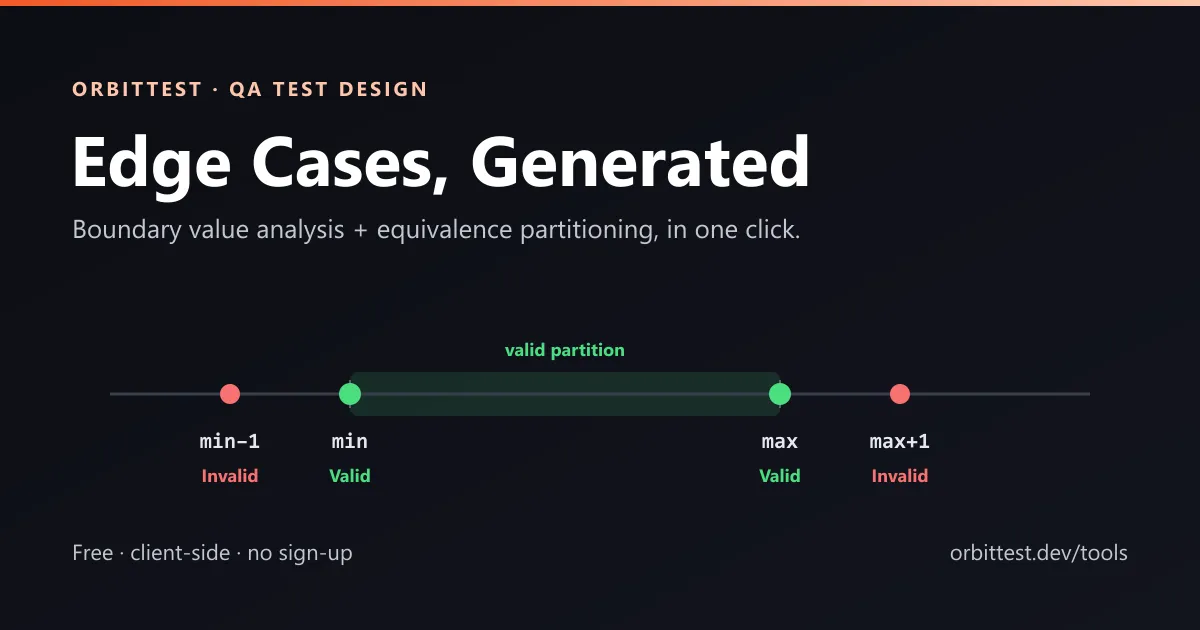
If equivalence partitioning picks the middle of each group, boundary value analysis (BVA) targets the edges, because that’s where defects cluster. For the 18–99 range, BVA tests:
- 17 (just below the minimum — should be rejected)
- 18 (the minimum — should be accepted)
- 19 (just inside the minimum)
- 98 (just inside the maximum)
- 99 (the maximum — should be accepted)
- 100 (just above the maximum — should be rejected)
That “just below / on / just above” pattern is what catches the > vs >= mistakes. The same logic applies to string length (min and max characters, plus one under and one over), dates (the first and last valid day, plus the day before and after), and collections (empty, one item, maximum size). Together, the two techniques are recognised by bodies like the ISTQB as core black-box test-design methods — and for good reason: they find a disproportionate share of validation defects.
Why generate these instead of writing them by hand
The techniques are simple; the bookkeeping is not. A signup form with eight fields can easily need 60–80 carefully labelled cases — valid and invalid, with empty and null variants per field. Build that grid by hand and you’ll spend an hour, make a transcription error, and redo it the moment a requirement changes.
That’s exactly what the Boundary Value & Equivalence Partitioning Generator automates. You declare each field — its type (integer, decimal, string, email, date, boolean, or enum), its constraints, and whether it’s required — and it produces the full set of boundary and partition cases, each tagged valid or invalid with a plain-English rationale. You can export the result to CSV for a test-management tool or to JSON to feed a data-driven automated run. Everything happens in your browser; no field names or constraints are uploaded.
A worked example
Take a username field: a required string, 3–20 characters. The generator produces cases like these:
| Value | Result | Technique | Rationale |
|---|---|---|---|
aaa | Valid | BVA | Minimum length (3) |
aa | Invalid | BVA | Below minimum length (2) |
20 × a | Valid | BVA | Maximum length (20) |
21 × a | Invalid | BVA | Above maximum length (21) |
11 × a | Valid | EP | Representative of valid length |
(spaces) | Invalid | EP | Whitespace-only |
(empty) | Invalid | EP | Required field left empty |
Notice how the easy-to-forget cases — whitespace-only, required-but-empty, the off-by-one on each end — appear automatically. The technique is only valuable if you apply it completely, and a generator guarantees you do.
Best practices for edge-case testing
- Always test the boundary and one step past it. A value on the limit and the value just beyond it catch almost all off-by-one defects.
- Treat “required” as its own dimension. Empty and null are valid for optional fields and invalid for required ones — generate both.
- Don’t forget type mismatches. A numeric field should be tested with letters; a date field with a wrong format and an impossible date like 2026-02-30.
- Re-generate when requirements change. Test cases derived from constraints are cheap to regenerate — treat them as derived artefacts, not hand-crafted ones.
- Promote the important ones into automation. Export to JSON and drive them as a data-driven test run so they execute on every build.
Common mistakes
- Testing only the middle of a range. A value like 45 proves nothing about whether 18 or 99 are handled correctly.
- Skipping invalid cases. Negative testing — confirming the system rejects bad input — is where security and data-integrity bugs surface.
- Ignoring string boundaries. Length limits get the same off-by-one bugs numbers do; test min, max and one beyond each.
- Hand-maintaining grids. Manually edited case tables drift out of sync with the spec; generate them from the constraints instead.
Frequently asked questions
What is the difference between boundary value analysis and equivalence partitioning?
Equivalence partitioning divides inputs into groups that behave the same and tests one representative per group. Boundary value analysis tests the values at the edges of those groups — the minimum, maximum, and the values just inside and just outside. They are complementary: partitioning reduces the number of cases, BVA targets where defects actually occur.
How do you generate boundary value test cases?
Identify each input’s valid range or length, then create test values for: just below the minimum, the minimum, just inside the minimum, just inside the maximum, the maximum, and just above the maximum — plus invalid cases like empty, null and wrong type. A generator can produce all of these automatically from the field’s constraints.
Are these techniques still relevant for API and automated testing?
Yes. Boundary and partition cases are ideal inputs for data-driven API tests and contract checks — they exercise validation logic systematically. Exporting generated cases to CSV or JSON lets you run them in an automated suite rather than by hand.
Is the test case generator free and private?
Yes. The OrbitTest generator is free, requires no sign-up, and runs entirely in your browser — your field definitions never leave your device.
Conclusion
Boundary value analysis and equivalence partitioning endure because they work: a small, well-chosen set of edge cases finds more validation bugs than endless happy-path testing. The only thing that held them back was the manual effort — now a solved problem.
Define your fields once, generate the full set of edge cases, export them, and move on to the testing that actually needs your judgement.
Further reading: ISTQB test design techniques, boundary value analysis (Wikipedia), and the YAML specification.
Written by Abhay Kumar — QA engineer and creator of OrbitTest, building practical tools for browser, mobile, and API testing. Browse more API testing articles.