It’s 6:47 PM. The demo is at 7. And the staging server — the one thing standing between you and going home a hero — picks this exact moment to die. The backend team is “looking into it.” Your frontend is throwing red errors across every screen.
Every developer has lived some version of this story, and every developer has muttered the same words: “I just need the API to answer. I don’t care how.”
That is the exact moment Ghost Mock Server was built for. When your real server goes down, its ghost keeps answering.
What is Ghost Mock Server?
Ghost Mock Server is a local API mock server built directly into Orbittest Client, the offline-first API testing tool. It works on one deceptively simple idea:
Every API response you’ve already received is a mock waiting to happen.
You’ve been sending requests all week — GET users, POST orders, PUT profiles. Orbittest Client recorded every reply. Ghost takes that recorded traffic and resurrects it as a live local HTTP server at http://127.0.0.1:4090. Point your frontend, your mobile app, or a teammate’s machine at it, and the “server” answers with pixel-perfect real responses — real headers, real status codes, real bodies.
No mock definitions. No YAML. No JSON fixtures written at midnight. No cloud account, and no “you’ve hit your free-tier mock limit.” One toggle, and a dead server becomes an undead one.
🎥 See it in action: watch a short Ghost Mock Server demo covering the full record-and-replay flow end to end.
Key takeaways
- Recording is the only setup. Send each request once against the real API; Ghost replays the captured response with its original headers, status code, and body. Your mock can’t drift from reality, because it is reality, captured.
- Dynamic routes come free. Record
GET /users/1once and Ghost automatically answers/users/2,/users/42, and/users/9000— it detects numeric ids, UUIDs, and MongoDB ObjectIds and promotes them to:idparameters. - The mock stays in character. Ghost rewrites the id in the response body to match the one you requested, preserving types, so your UI shows user 2 when you ask for user 2.
- A 0 ms mock is a lie. Three latency modes — Instant, Realistic (replays each request’s actual recorded response time), and Slow (recorded + 2 s) — keep loading states and timeout handling honest.
- You can watch it work. The Ghost Control Center at
/__orbit__streams live per-route hit counts and a rolling activity log, so “is my app even calling the mock?” becomes a glance, not a guessing game. - Everything stays on your machine. Ghost binds to loopback only; recorded API data never touches a cloud service.
Table of contents
- Why API mocking matters
- The problem with traditional mock servers
- How Ghost Mock Server works
- What makes Ghost different
- Real-world use cases
- Ghost vs traditional and cloud mock servers
- Getting started in 30 seconds
- When to use Ghost — and when not to
- Frequently asked questions
Why API mocking matters
Teams underestimate how much time is lost waiting for APIs. The familiar spiral: the frontend team starts building, the backend endpoints are still under construction, integration slips, testing gets blocked, and delivery slows to the speed of the slowest dependency.
A mock server breaks that chain:
- Frontend developers build complete interfaces while the backend is still “two days away.”
- QA engineers test workflows without depending on shared, unstable environments.
- Product managers run demos that don’t gamble on staging uptime.
Work continues in parallel instead of stalling on a single blocker.
The problem with traditional mock servers
Most API mocking tools make you describe your API before they’ll fake it. The typical setup: write route definitions, author JSON response files, configure methods and headers, host the thing somewhere, and then — the part everyone forgets — update all of it by hand every time the real API changes.
For a real-world API with dozens of endpoints, that maintenance becomes its own engineering task. Fixtures rot. The mock quietly drifts away from production behavior, and the tests running against it start passing for the wrong reasons. You built the mock to save time and ended up with a second codebase to maintain.
Ghost flips the model entirely: instead of describing the API, it learns from real traffic.
How Ghost Mock Server works
Three steps, no configuration.
Step 1: Send a request once
Use Orbittest Client to hit the real API as you normally would:
GET /users/1The server returns:
{
  "id": 1,
  "name": "John Doe",
  "email": "john@example.com"
}
Ghost records the response automatically — status, headers, body, and even the response time (that last part matters later). Bringing a request over from a terminal or docs? The cURL to code converter turns an existing curl command into a request you can send and record, and the JSON formatter makes a minified payload readable before you rely on it as a mock.
Step 2: Flip the toggle
Enable Ghost Mock Server from the sidebar card. Orbittest Client immediately starts a local mock server at:
http://127.0.0.1:4090Step 3: Point your app at the ghost
Change your application’s API base URL from:
https://api.company.comto:
http://127.0.0.1:4090Your application now receives the recorded responses with no backend dependency at all. For the deeper walkthrough of requests, collections, and environments, see the Orbittest Client user guide.
What makes Ghost different
Record-and-replay alone would already beat hand-written fixtures. But replaying static responses is table stakes — the features below are what make Ghost feel like a real server rather than a tape recorder.
Dynamic routes that understand your URL structure
Here’s the genuinely unusual part. Record GET /users/1 once. Now call /users/2, /users/42, /users/9000 — Ghost answers all of them.
Ghost detects id-like path segments — numbers, UUIDs, and MongoDB ObjectIds — and automatically promotes recorded paths into dynamic parameterized routes (/users/:id). It even handles multiple parameters in a single path, so /users/7/posts/99 matches a recording of /users/1/posts/5 as /users/:id/posts/:id2. There are no route templates to write; Ghost simply understands your URL structure.
And exact matches always win. If you recorded a special route like /users/me, it is never swallowed by the /users/:id pattern. The ghost knows who’s who.
Id echo: a mock that stays in character
Most stub servers, asked for /users/2 when only /users/1 exists, lazily hand back user 1’s body — and your UI renders the wrong record. Ghost doesn’t. It rewrites the response so the id you asked for is echoed back: request user 2, and the body says "id": 2.
The rewriting is careful in ways that matter: numbers stay numbers, strings stay strings, and whole-value matching means an id of 1 never corrupts a 100 hiding elsewhere in the payload. Your mock doesn’t just answer — it answers correctly.
Latency modes: because a 0 ms mock is a lie
Instant mocks hide real-world bugs. A UI that looks fine against a 0 ms mock can fall apart against a 900 ms production endpoint — spinners that never render, race conditions that never fire, timeouts that never trip. Ghost ships three latency personalities:
| Mode | Behavior | Best for |
|---|---|---|
| ⚡ Instant | Responds in 0 ms | Raw speed during rapid iteration |
| 🎯 Realistic (default) | Replays each request’s actual recorded response time | Making the mock feel like production, endpoint by endpoint |
| 🐢 Slow | Recorded time + 2 seconds | Testing loading spinners, skeleton screens, and timeout handling |
Switch modes mid-session and Ghost restarts itself automatically. Try getting that from a hand-rolled Express stub.
The Ghost Control Center dashboard
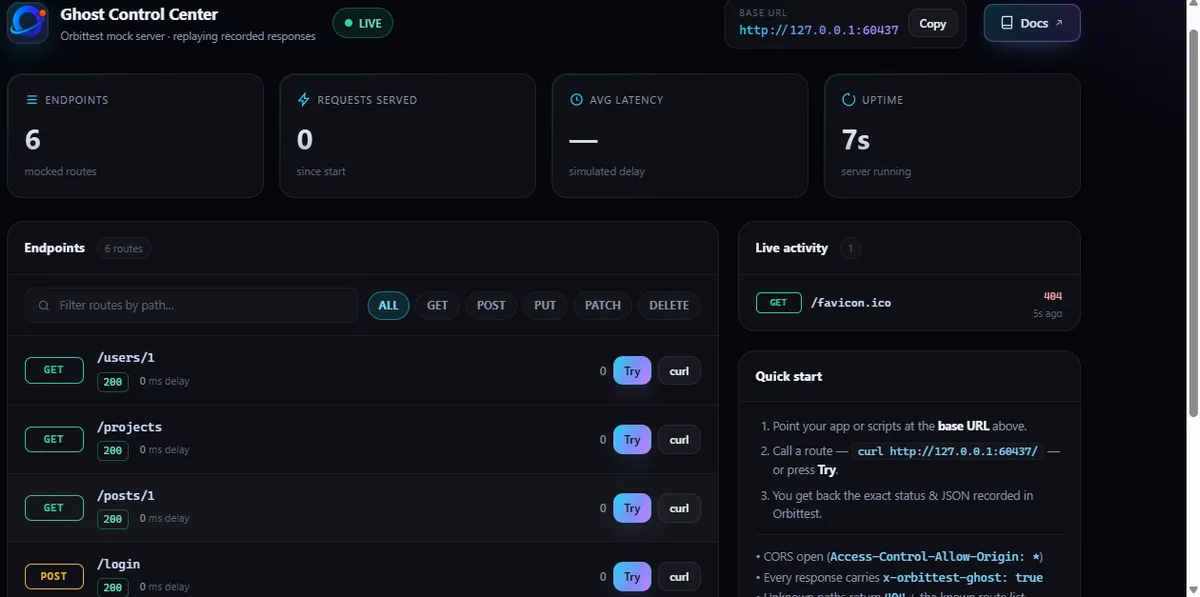
Open http://127.0.0.1:4090/__orbit__ in a browser and you get the Ghost Control Center — a live dashboard with KPI tiles, per-route hit counters, HTTP method badges, :id chips marking dynamic routes, and a rolling activity log streaming every request the mock serves.
Debugging “is my app even calling the mock?” stops being a guessing game with console logs and becomes a glance at a page.
A fixed address, every session
Ghost binds a fixed port — 4090 — and fully releases it on stop, so your mock base URL never plays musical chairs between sessions. Hardcode http://127.0.0.1:4090 in your dev config once and forget it. If another process is squatting on the port, Ghost gracefully grabs a free one and tells you via a toast notification.
Local-first by design
Ghost binds to the loopback interface only — your recorded API data never leaves your machine. There is no cloud sync, no account, and no third party holding your payloads.
It’s built defensively under the hood, too: segment-based route matching instead of regex (no ReDoS surface), prototype-pollution-safe body rewriting, and XSS-hardened dashboard rendering. A mock server that takes security more seriously than some real servers do.
Real-world use cases
Demo-day insurance. Present against Ghost; the live staging server can burn in peace. Because the responses are already recorded, the demo works even with the Wi-Fi down.
Frontend–backend decoupling. The UI team ships against recorded responses while the backend is still in progress. Integration stops being a serialized bottleneck.
Offline API development. Code on a flight, in a basement, or on a train through a tunnel. Recorded responses keep answering when the real API is unreachable.
Teammate handoff. A colleague’s app keeps working while the real service is down for maintenance — point their machine at your Ghost and they never notice the outage.
Loading-state and timeout testing. Slow mode is a spinner-tester’s dream: every endpoint takes its real recorded time plus two seconds, deterministically.
Deterministic testing. Same request, same response, every time. Flaky failures caused by shifting backend data are exorcised. When you need to prove two responses really are identical, the JSON diff tool makes the comparison obvious at a glance.
Third-party API development. Payment gateways, weather APIs, CRMs — calling them repeatedly during development is slow, rate-limited, and sometimes billed per request. Record once, develop locally, and stop burning quota.
Ghost vs traditional and cloud mock servers
| Capability | Hand-rolled stub / fixture files | Cloud mocking service | Ghost Mock Server |
|---|---|---|---|
| Setup required | Route configs + JSON fixtures | Account, spec upload, per-mock config | Send each request once |
| Uses real responses | Rarely | Only if imported | Always — recorded from real traffic |
Dynamic :id routes | Manual templates | Manual rules | Automatic (numbers, UUIDs, ObjectIds) |
| Id echoed back in body | No | Rarely | Yes, type-safe |
| Latency simulation | DIY setTimeout | Basic fixed delay | Recorded per-endpoint timing + Slow mode |
| Live traffic dashboard | No | Sometimes | Yes — Control Center at /__orbit__ |
| Works offline | Yes | No | Yes |
| Data leaves your machine | No | Yes | Never — loopback only |
| Maintenance effort | High | Medium | Near zero |
The pattern is clear: every other approach asks you to describe the API. Ghost asks for nothing you weren’t already doing.
Getting started in 30 seconds
- Send each request you want mocked at least once — Ghost replays what it recorded.
- Flip the Ghost Mock Server toggle in the sidebar card of Orbittest Client.
- Point your app at
http://127.0.0.1:4090. - Open the Control Center at
/__orbit__and watch the hit counters light up.
That’s the entire tutorial. No 40-page docs, no video course. Your API now has an afterlife. If you haven’t installed the client yet, the installation guide gets you from download to first request in a couple of minutes.
When to use Ghost — and when not to
Ghost is ideal when:
- ✅ Backend development is incomplete or unstable
- ✅ You need a reliable demo environment
- ✅ Third-party services are rate-limited or metered
- ✅ Tests need predictable, repeatable responses
- ✅ You’re developing offline or in a locked-down network
- ✅ You want realistic latency without a real server
Ghost may not be the right fit when:
- ❌ You need dynamic business logic in responses (computed prices, conditional branching)
- ❌ Responses must change based on complex multi-step state
- ❌ You require advanced stateful workflows (create → list → delete consistency)
For those cases you’re in service-virtualization territory, and a programmable mock is the right tool. For the everyday 90% — building, testing, demoing — record-and-replay covers everything teams actually need. And because a recorded mock is a frozen contract, pairing Ghost with schema validation is powerful: treat a known-good response as the contract, then let Orbittest Client’s data-driven testing run the same checks across many inputs. If contracts between teams are your bigger concern, our guide to contract testing picks up where mocking leaves off.
Frequently asked questions
What is Ghost Mock Server?
Ghost Mock Server is a local API mock server built into Orbittest Client. It records the real API responses you send during normal work and replays them from a local HTTP server at http://127.0.0.1:4090 — real headers, real status codes, real bodies. There are no mock definitions, fixture files, or cloud accounts: every response you have already received becomes a working mock the moment you flip the toggle.
How do I create a mock REST API without writing code or config files?
Use a record-and-replay mock server. In Orbittest Client, send each request you want mocked at least once against the real API, then enable the Ghost Mock Server toggle in the sidebar. Ghost starts a local server that replays the recorded responses. Point your app’s base URL at http://127.0.0.1:4090 and it receives real captured responses — no route definitions, JSON fixtures, or schemas required.
Can a mock server handle dynamic routes like /users/:id automatically?
Ghost Mock Server can. It detects id-like path segments — numbers, UUIDs, and MongoDB ObjectIds — and automatically promotes recorded paths into parameterized routes. Record GET /users/1 once and Ghost answers /users/2, /users/42, or /users/9000, rewriting the id in the response body to match the one you requested. Exact recorded paths always take precedence over dynamic patterns, so a special route like /users/me is never swallowed.
How do I simulate API latency in a mock server?
Ghost Mock Server ships three latency modes. Instant answers in 0 ms for raw speed. Realistic, the default, replays each request’s actual recorded response time so the mock feels like production endpoint by endpoint. Slow adds 2 seconds on top of the recorded time, which is purpose-built for testing loading spinners, skeleton screens, and timeout handling. Switching modes restarts the server automatically.
Does my recorded API data leave my machine when I use Ghost Mock Server?
No. Ghost binds to the loopback interface (127.0.0.1) only, so recorded requests and responses never leave your machine and are never uploaded to any cloud service. Internally it uses segment-based route matching rather than regex (no ReDoS surface), prototype-pollution-safe body rewriting, and an XSS-hardened dashboard.
What port does Ghost Mock Server run on?
Ghost binds a fixed port — 4090 — and fully releases it on stop, so your mock base URL stays http://127.0.0.1:4090 across sessions and you can hardcode it once in your dev config. If another process is already using the port, Ghost gracefully picks a free one and tells you via a toast notification.
The bottom line
Every mock server asks you to do the work: describe endpoints, write fixtures, maintain configs that rot. Ghost asks for nothing — it quietly turns the traffic you already generated into a living, id-improvising, latency-faithful stand-in for your backend.
Your backend will go down someday. The only question is whether its ghost will be ready.
Orbittest Client. Flip the toggle. Summon the Ghost. 👻