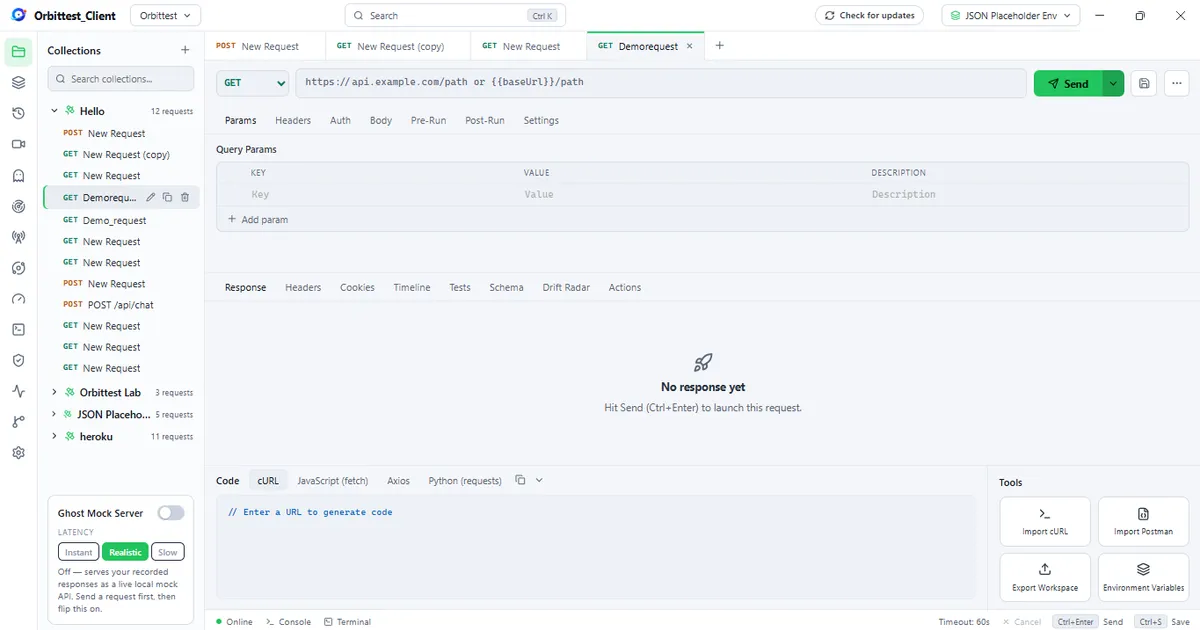
Orbittest Client is a desktop application (Windows, macOS, Linux) for sending API requests and inspecting responses — the same job Postman, Insomnia, or Bruno do — built on one uncompromising principle: nothing you do ever leaves your machine unless you explicitly push it somewhere.
Your collections, environments, history, and settings are stored in one plain JSON file (by default Documents/Orbittest/workspace.json). Back it up by copying a file. Share it by pushing to your own GitHub repo. Delete it and it’s gone. There is no sync service in the middle, no telemetry, and nothing to sign up for.
The problem: API clients quietly became cloud services
If you’ve used API tooling for the last few years, you’ve watched a pattern repeat:
- Postman reorganized around cloud workspaces and accounts; the offline Scratch Pad was retired, and features like monitors and mock servers run in — and bill through — Postman’s cloud.
- Insomnia’s 2023 cloud-first release triggered enough backlash that community forks appeared overnight.
- Teams responded by moving to Bruno and other file-based tools — a great step, but most of them cover only the request-builder slice of the job.
The result is a strange gap. The moment your work involves real API traffic — a token, a customer payload, an internal hostname — the most popular tools want that data on someone else’s server. And the moment you need more than a request builder (watch live traffic, monitor an endpoint overnight, mock a dead dependency), you’re buying a second tool or a higher cloud tier.
Orbittest Client exists to close that gap: one desktop app that covers the whole API workflow, with a hard guarantee that your data stays local.
Everything you expect from a modern API client
The foundation is a full request workbench, and it doesn’t cut corners:
- Requests — all HTTP methods, query params, headers, auth (Bearer, Basic, API key, and full OAuth 2.0 flows), JSON/text/form/GraphQL bodies, per-request timeouts and TLS overrides.
- Variables done properly — four scopes (global → collection → environment → local) with clear precedence,
{{variable}}autocomplete, dynamic values like{{$randomUUID}}and{{$timestamp}}, and an amber warning listing any unresolved variables before you send. - Scripting — pre-run and post-run JavaScript with a Jest-like
ot.expect()assertion API, run inside a network-isolated sandbox worker (no DOM, no bridge, hard timeout), with 20 ready-made snippets. - Code generation — turn any request into cURL, JavaScript
fetch, Axios, or Pythonrequests. - Organization — collections, folders, tabs, a Ctrl+K command palette, and drag-and-drop to move requests between collections and folders.
- Postman migration — import Postman v2.1 collections from a file, a URL, or an entire GitHub/Git repository, environments and variables included.
That alone makes it a working Postman replacement. What follows is where it stops being a clone.
Beacon: a traffic-capture proxy built into your API client
What it solves: “The docs say one thing, the app does another — what is actually going over the wire?”
Beacon is a Charles/Fiddler-style capturing proxy, one click away in the same app. Start it and it points your system proxy at itself (and restores it when you stop, even after a crash). Every HTTP request your machine makes appears in a live list; flip on HTTPS decryption — powered by a certificate generated only on your machine — and you see full decrypted request and response bodies too.
Then it goes further than a classic proxy: a built-in Service Health dashboard turns captured traffic into APM-style analytics — throughput, error rate, latency percentiles (p50–p99), Apdex scores, a service map, top hosts and endpoints, bandwidth and third-party breakdowns, a compression/cache audit, and an exposed-secrets panel that flags credentials appearing in traffic. You can export everything as a standard HAR file.
Pulsar: scheduled API monitoring without a cloud subscription
What it solves: “I want to know my API is up and fast — without paying per-monitor cloud pricing or shipping my auth tokens to a SaaS.”
Pulsar turns any collection into a scheduled monitor: pick an environment and a schedule (every minute to daily) and it runs locally, feeding a dashboard of uptime, test pass-rate, error rate, and p95 latency. Alerts go to desktop notifications or any Slack-compatible webhook, with debouncing (“alert only after N consecutive failures”), schema-drift alerts when a response’s shape changes, and secret-leak alerts when credentials show up in a response. You can track SLOs with error-budget burn and even export a self-contained static status page to host anywhere.
Need it running while the app is closed? The bundled CLI registers a monitor with your OS scheduler (Task Scheduler or cron) — always-on monitoring, still 100% on your infrastructure.
Ghost: your recorded responses become a mock server
What it solves: “The backend is down (or doesn’t exist yet) and the frontend team is blocked.”
Send each request once, flip a toggle, and Ghost serves your recorded responses as a live local mock API on a stable port (http://127.0.0.1:4090). Recorded paths with id-like segments become dynamic routes — recording GET /users/1 also answers /users/2 and /users/42, echoing the requested id back into the body. A latency control replays each request’s real recorded response time (or adds two seconds to exercise loading spinners), and a dashboard shows every route and hit count.
Insights that work without configuration
Every response is analyzed automatically:
- Orbit Score — a 0–100 health grade blending reliability, schema stability, and speed.
- Contract Drift Radar — diffs each response’s schema against the previous run and flags added, removed, or changed fields, catching silent API contract breaks.
- Secret Guard — scans responses, headers, and URLs for leaked tokens, JWTs, AWS keys, and password-like values.
- Flight Recorder — a searchable history of every request, re-openable with one click.
Secrets that genuinely cannot leak
Local-first is also a security posture, and Orbittest treats credentials as radioactive:
- Variables can be flagged secret — masked in the UI and redacted from every export and Git push.
- Scripts that capture tokens can store them pre-flagged:
ot.setEnvVar("token", token, { secret: true }). - New variables whose values look like credentials (JWTs, bearer tokens, AWS keys) are auto-flagged.
- Before any export or push, an audit lists any unflagged secret-looking variable — names only, never values — and asks before anything leaves the machine.
Collaboration through Git, not through someone’s cloud
The built-in Source Control panel commits and pushes your workspace to your own GitHub repository — real staging, inline diffs, commit history, and per-collection pushes, with your token stored OS-encrypted. Teammates import straight from the repo URL. You get versioned, reviewable API collections with your existing Git permissions — no new vendor, no seat pricing.
For CI, the CLI runner executes collections headlessly with human, JSON, and JUnit reporters — JUnit test identities use the stable Collection/Folder/Request path, so your CI dashboard’s pass/fail history survives renames of hosts and methods. Data-driven runs iterate a CSV/JSON file row by row.
There’s even an integrated terminal (real PTY sessions — PowerShell, Git Bash, WSL, zsh) that opens in your workspace folder, so git, the orbittest CLI, and AI tools like Claude Code can act on your collection files directly.
How Orbittest Client compares
| Capability | Orbittest Client | Postman | Insomnia | Bruno |
|---|---|---|---|---|
| Account required | Never | For most features | For sync/cloud | No |
| Where your data lives | Your disk (one JSON file) | Postman cloud | Local + optional cloud | Local files |
| Traffic-capture proxy (HTTPS) | Built in | — | — | — |
| Scheduled monitors | Built in, runs locally | Cloud, paid tiers | — | — |
| Mock server | Built in, offline | Cloud-based | Limited | — |
| Git collaboration | Built-in push + import | Via cloud workspaces | Via Git sync (account) | Files in your repo |
| Integrated terminal | Yes | — | — | — |
| Works fully offline | Yes | Partially | Partially | Yes |
Feature availability in other tools as commonly configured at the time of writing; check each vendor for current details.
The honest summary: Bruno shares the local-first philosophy and is a fine choice if a request builder is all you need. Orbittest Client is for when you want the proxy, the monitors, the mock server, and the analytics in the same private-by-default package — capabilities that otherwise mean buying Charles plus a monitoring SaaS plus a cloud API platform.
Who is it for?
- Backend and frontend developers who want one tool for building, debugging, and mocking APIs.
- Teams handling sensitive data — healthcare, fintech, internal tools — where “we uploaded staging tokens to a SaaS” is an incident report waiting to happen.
- QA and DevOps engineers who need CI-friendly collection runs and always-on monitors without new vendor onboarding.
- Anyone burned by cloud pivots who wants their tooling to still work, unchanged, in ten years — offline.
Frequently asked questions
Is Orbittest Client free? Yes — the core client is free with no account. A Pro license (verified fully offline, machine-locked) removes limits such as Beacon session length and collection caps.
Does any of my data leave my machine? No. There’s no telemetry, no sync service, and no account. Data leaves only when you export a file or push to your own Git repository — and even then, secret variables are redacted and a final audit warns about anything credential-shaped.
Can it replace Postman? For individual and team workflows built on collections, environments, scripting, and CI runs — yes, and it imports your existing Postman v2.1 collections, environments included. If your team depends on Postman’s cloud workspace commenting and roles, you’d swap that layer for Git-based collaboration.
How does HTTPS traffic capture stay private? Beacon decrypts HTTPS using a root certificate generated on your machine, with the key stored OS-encrypted. It’s opt-in, per-host allowlisted, and traffic is never sent anywhere — the “cloud” in this proxy is your RAM.
Does it work completely offline? Yes. Every feature — including mock servers, monitors, dashboards, and license verification — functions without an internet connection. You only need connectivity to reach the APIs you’re testing.
The bottom line
API tooling drifted to the cloud because vendors monetize better there — not because your requests, tokens, and response payloads are safer there. Orbittest Client is a bet on the opposite: a single desktop app covering the entire API lifecycle — build, debug, capture, mock, monitor, share — where the only copy of your data is the one you control.
Download Orbittest Client, point it at your API, and send your first request in under a minute — no signup, ever.