When you work with APIs, the first thing you see after sending a request is a number. Sometimes it’s a friendly 200 OK. Sometimes it’s 404 Not Found. And sometimes it’s the one that ruins an afternoon: 500 Internal Server Error.
Most developers know these numbers exist. Many testers glance at them. But surprisingly few people fully understand what HTTP status codes mean, why they exist, and how they should be tested. That’s a problem, because status codes are one of the most important communication mechanisms in software — they tell you whether a request succeeded, whether authentication failed, whether data was invalid, whether a resource exists, and whether the server itself is healthy.
This guide breaks down every major category with real examples and the exact testing scenarios that catch bugs. By the end you’ll read a status code the way a senior engineer does: as the first and fastest clue about what just happened.
Table of Contents
- What Is an HTTP Status Code?
- Why Status Codes Matter
- The Five Categories of HTTP Status Codes
- 1xx Informational Responses
- 2xx Success Responses
- 3xx Redirection Responses
- 4xx Client Errors
- 5xx Server Errors
- Status Code Cheat Sheet
- A Real API Testing Checklist
- Best Practices
- Common Status Code Mistakes
- Testing Status Codes with Orbittest Client
- Frequently Asked Questions
- Conclusion
What Is an HTTP Status Code?
Every time a client sends a request to a server, the server sends back a response. The response starts with a three-digit number — the status code.
GET /users/123HTTP/1.1 200 OKThat 200 is the server’s quick answer to one question: “How did your request go?” Before you even read the response body, the status code already tells part of the story. The full set of codes is standardized — you can browse the complete list in the MDN HTTP response status codes reference and the official IANA status code registry.
Why Status Codes Matter
Imagine an API that always returns 200 OK, even when something goes wrong. You’d never know whether the user existed, the login failed, or the database crashed — every response would look successful. Debugging would be guesswork.
Status codes solve this by providing a standardized language understood across the whole stack:
- Browsers
- Mobile apps
- Backend services
- Testing tools
- Monitoring and alerting platforms
When a monitoring system sees a spike in 5xx responses, it can page an on-call engineer automatically. That only works because everyone agrees on what the numbers mean.
The Five Categories of HTTP Status Codes
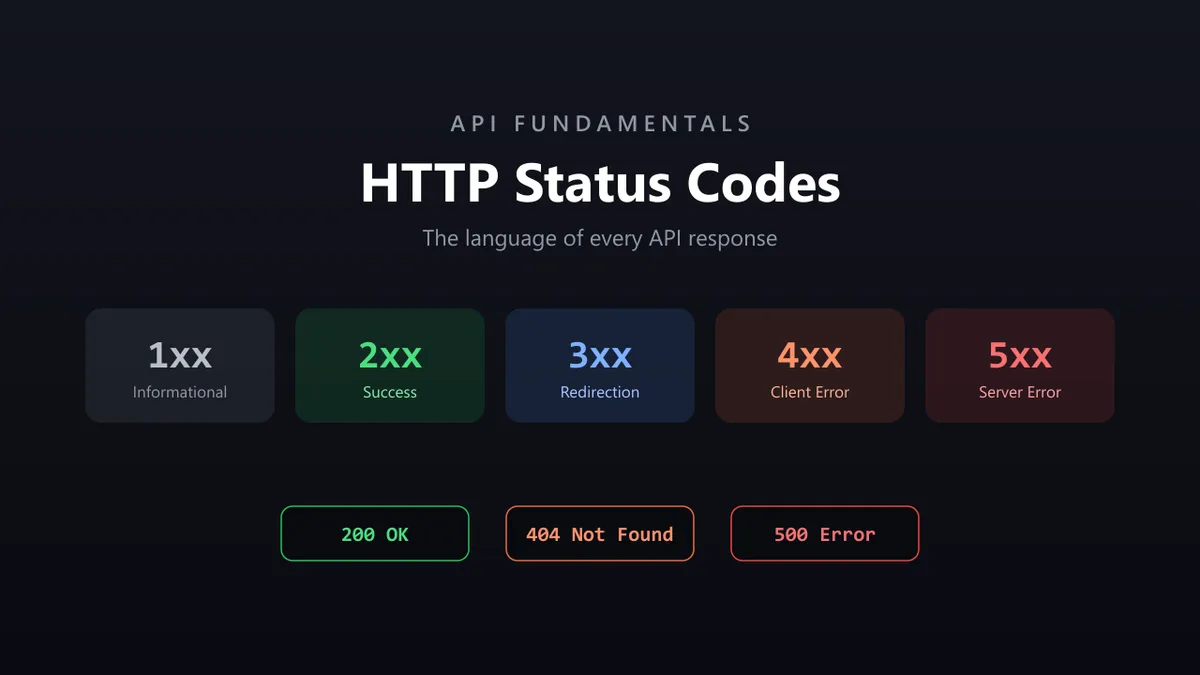
Every status code belongs to one of five groups, identified by its first digit:
| Range | Category | One-line meaning |
|---|---|---|
1xx | Informational | Hold on, still processing |
2xx | Success | It worked |
3xx | Redirection | Go somewhere else |
4xx | Client Error | You made a mistake |
5xx | Server Error | The server made a mistake |
A simple way to remember it: 1 = hold on, 2 = success, 3 = go elsewhere, 4 = your fault, 5 = server’s fault. Get this much, and you can triage almost any response instantly.
1xx Informational Responses
These are rare in day-to-day API testing. They signal that the request was received and processing continues.
100 ContinueThis tells the client the server received the initial headers and it’s fine to send the request body — useful for large uploads. As a tester, you’ll seldom need to validate 1xx codes directly; browsers and HTTP libraries handle them under the hood.
2xx Success Responses
Everyone’s favorite category. But not all successes are the same, and using the right one matters.
200 OK
The most common code. The request succeeded and the response carries the result.
GET /users/123{ "id": 123, "name": "John" }Typical for GET requests, searches, and data retrieval.
201 Created
Returned when a new resource is created — usually after a POST.
POST /users201 CreatedMany APIs incorrectly return 200 OK here. Good testers verify that resource creation returns 201 (often with a Location header pointing to the new resource).
202 Accepted
The request was accepted but not finished yet — common for background jobs, file processing, or report generation.
POST /video-processing202 AcceptedThe server is effectively saying, “I’ve got it, I’ll process this later.”
204 No Content
Success, but there’s no response body to return — frequently used for DELETE.
DELETE /users/123204 No ContentA classic testing bug: trying to parse JSON from a 204 response. There is no body to parse, so guard against it.
3xx Redirection Responses
These tell the client the resource lives somewhere else.
- 301 Moved Permanently — use the new URL from now on (e.g.,
http://→https://). Great for SEO link equity. - 302 Found — a temporary redirect; the original URL may return later.
- 304 Not Modified — used with caching. Your cached copy is still valid, so the server skips re-sending the data, improving performance.
4xx Client Errors
This is the category API testers care about most, because it’s where validation, authentication, and authorization live.
400 Bad Request
The server can’t understand the request — malformed JSON, missing fields, or invalid parameters.
{ "email": }400 Bad RequestAlways verify the API returns a helpful validation message, not just the status. If your JSON keeps coming back malformed, a quick pass through a JSON formatter usually reveals the stray comma or brace.
401 Unauthorized
Authentication failed — a missing, expired, or invalid token.
GET /profile # no token401 UnauthorizedIf you’re debugging token problems, decode the token first with the JWT debugger to check its claims and expiry. For the bigger picture, see our guide to API authentication: OAuth, JWT & tokens.
403 Forbidden
Authentication succeeded, but the user isn’t allowed to do this.
DELETE /users # regular user attempts an admin action403 ForbiddenThe distinction is worth memorizing: 401 = “who are you?”, 403 = “I know who you are, and you still can’t.” The difference is detailed in the MDN 401 documentation.
404 Not Found
The requested resource doesn’t exist — an invalid ID, a deleted record, or a wrong endpoint.
GET /users/99999404 Not Found405 Method Not Allowed
Right endpoint, wrong HTTP method — for example a POST to an endpoint that only supports GET.
409 Conflict
The request conflicts with the current state, such as creating a user with an email that already exists.
409 Conflict415 Unsupported Media Type
The server received a format it doesn’t accept — e.g. Content-Type: text/plain when the API expects application/json.
422 Unprocessable Entity
Extremely common in modern APIs. The JSON is syntactically valid, but it fails business validation (like an email in the wrong format).
{ "email": "invalid-email" }422 Unprocessable EntityThe key difference: 400 = malformed request; 422 = valid request, invalid data.
429 Too Many Requests
Rate limiting. The client sent too many requests too fast.
429 Too Many RequestsModern APIs lean on this heavily — Stripe, GitHub, and OpenAI all use it. Responses usually include a Retry-After header; the MDN 429 reference covers the details.
5xx Server Errors
These are backend problems. Testers find them; developers fix them.
- 500 Internal Server Error — the classic catch-all crash: null references, database failures, logic bugs.
- 501 Not Implemented — the feature/endpoint isn’t built yet.
- 502 Bad Gateway — a gateway got an invalid response from an upstream service (common in microservices).
- 503 Service Unavailable — the server is temporarily down, often during deployments, maintenance, or overload.
- 504 Gateway Timeout — a gateway waited too long for an upstream service to respond.
The precise semantics for all of these are defined in RFC 9110 (HTTP Semantics), the authoritative spec.
Status Code Cheat Sheet
Keep this within reach when writing or testing an API:
| Code | Name | When to expect it |
|---|---|---|
| 200 | OK | Successful GET, search, or update |
| 201 | Created | Successful POST that creates a resource |
| 202 | Accepted | Async job accepted, not finished |
| 204 | No Content | Successful DELETE, no body |
| 301 | Moved Permanently | URL permanently changed |
| 304 | Not Modified | Cached copy still valid |
| 400 | Bad Request | Malformed request / invalid JSON |
| 401 | Unauthorized | Missing or invalid authentication |
| 403 | Forbidden | Authenticated but not permitted |
| 404 | Not Found | Resource or endpoint doesn’t exist |
| 409 | Conflict | Duplicate or state conflict |
| 422 | Unprocessable Entity | Valid syntax, failed validation |
| 429 | Too Many Requests | Rate limit exceeded |
| 500 | Internal Server Error | Unhandled server crash |
| 503 | Service Unavailable | Temporary outage / maintenance |
A Real API Testing Checklist
When you test an API, don’t stop at 200 OK. Validate the whole response:
- Status code. Is it the correct one?
POST→201,DELETE→204, no token →401, wrong role →403. - Response body. Does the data match expectations? A JSON diff tool makes comparing actual vs expected responses painless.
- Response headers. Check
Content-Type: application/json, caching headers, andRetry-Afteron429s. - Response time. Fast matters — many teams target under ~500 ms for key endpoints.
- Error messages. A bad request should explain itself:
{ "error": "Email is required" }, not{ "error": "Something went wrong" }.
Best Practices
- Use the most specific code that fits.
201for creation,204for empty success,422for validation — not a blanket200. - Separate authentication from authorization. Return
401when identity is missing/invalid and403when it’s a permission issue. - Make
4xxresponses actionable. Include a clear, machine-readable error body so clients can react. - Never hide server failures behind
200. Monitoring depends on honest5xxcodes. - Include
Retry-Afteron429and503. It tells well-behaved clients exactly when to try again. - Test the unhappy paths. Most production incidents live in the
4xx/5xxcases that nobody exercised.
Common Status Code Mistakes
APIs misuse status codes constantly. The worst offenders:
- Returning
200 OKfor a login failure (it should be401). - Returning
500 Internal Server Errorfor invalid user input (it should be400or422). - Returning
404 Not Foundwhen the real problem is permissions (it should be403). - Returning
200with an error message in the body instead of a real error code.
Every one of these makes debugging harder and breaks the tools and monitors that rely on accurate codes.
Testing Status Codes with Orbittest Client
Checking the status code is the first thing a tester does after sending a request. Orbittest Client makes that effortless by showing the response status, headers, timing, and payload together in one workspace — no digging through raw output.
More importantly, it supports post-run validation scripts that automatically assert the expected status code and fail the test the moment a response doesn’t match. Combined with environments, variables, and pre-run scripts, you can build a suite that verifies 201 on creation, 401 without a token, and 403 for the wrong role — automatically, on every run. The Orbittest Client user guide shows how to wire up those checks, and if you need predictable responses to test against, Ghost Mock Server can replay recorded responses (and specific status codes) locally.
Frequently Asked Questions
What is the difference between 401 and 403?
401 Unauthorized means you haven’t proven who you are — the credential is missing, invalid, or expired. 403 Forbidden means you are authenticated, but you don’t have permission for this action. In short: 401 is about identity, 403 is about permission.
What is the difference between 400 and 422?
400 Bad Request means the request itself is malformed — broken JSON, missing required structure. 422 Unprocessable Entity means the request is well-formed but fails business validation, like an email in an invalid format. Syntax vs. semantics.
Should a successful POST return 200 or 201?
If the POST creates a new resource, return 201 Created (ideally with a Location header). Use 200 OK only when the request succeeded without creating a resource. Many APIs get this wrong, so it’s worth testing.
Why does a DELETE return 204 instead of 200?
204 No Content signals success with no response body — perfect for deletions where there’s nothing meaningful to return. Just don’t try to parse JSON from a 204; there isn’t any.
What does 429 Too Many Requests mean?
You’ve hit a rate limit. Slow down and check for a Retry-After header that tells you how long to wait before retrying. It protects the API from overload and abuse.
Is a 4xx or 5xx error my fault?
A 4xx points to a problem with the request (your side) — bad data, missing auth, wrong endpoint. A 5xx points to a problem on the server. The first digit tells you who needs to fix it.
How do I test status codes automatically?
Use an API client that lets you assert the expected code in a post-run script, then run those assertions across environments. Tools like Orbittest Client fail the test automatically when the status doesn’t match, so regressions surface immediately.
Conclusion
HTTP status codes are the fastest signal you get from any API. Once you internalize the five categories — and the difference between 401 and 403, 400 and 422, 200 and 201 — you can diagnose most issues before you even open the response body.
So the next time a request comes back with a number, you won’t just see 500. You’ll know it’s the server’s fault, that monitoring should already be alerting, and exactly which tests should have caught it. That’s the difference between using APIs and truly understanding them.
Written by Abhay Kumar — QA engineer and creator of OrbitTest, writing about API testing, automation, and web security. Browse more API testing guides.